



Choosing a business name is one of the first and most important decisions you’ll make when launching an online store. A strong name helps define your brand, improves memorability, and creates a solid foundation for future marketing efforts. The Shopify Business Name Generator simplifies this process by providing instant name suggestions based on your ideas and industry keywords. This guide explains how the tool works, how to get better results from it, and what factors to consider before selecting a name for your business.
What is Shopify’s Business Name Generator?
Business name generator by Shopify is a free, AI-assisted naming tool built directly into Shopify’s suite of free resources for entrepreneurs. Unlike a plain domain registrar or a generic random-name tool, it was designed specifically for people who want to launch an online business, so every name suggestion it returns is paired with an instant check on whether the matching ‘.com’ domain is available.
What makes it stand out from generic alternatives is that it combines name generation with real-world availability data in one seamless workflow. By the time you have found a name you love, you already know whether you can actually claim it.

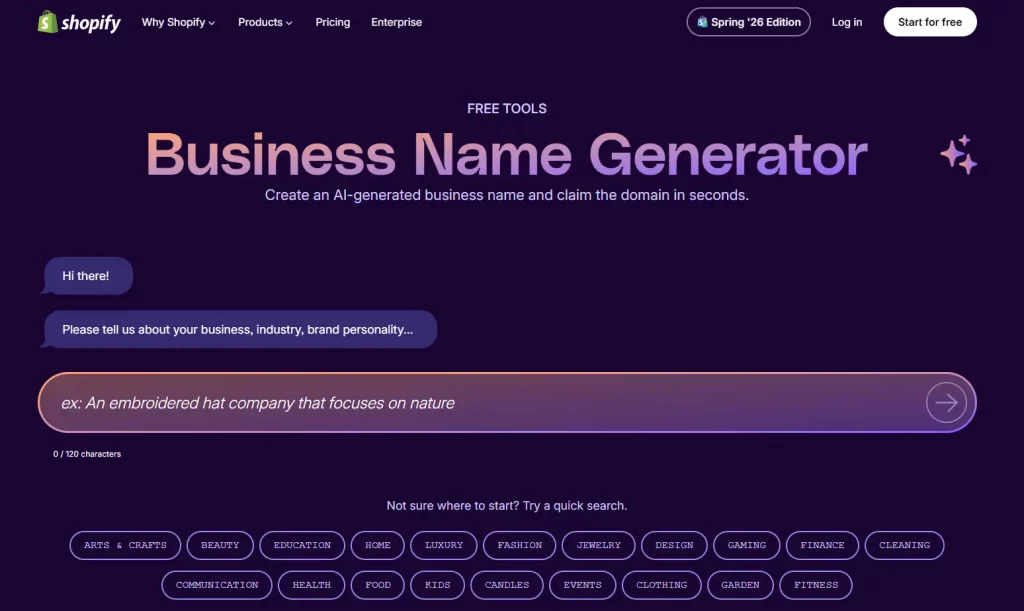
How to use the Shopify Business Name Generator
Using the tool takes less than two minutes from start to first results. Here is a precise walkthrough so you know exactly what to expect at each stage.
Step 1: Go to Shopify’s free name generator page
Open your browser and navigate to Shopify’s name generator tool. You will land on a clean, single-input page. You can access all of them without an account.
Step 2: Enter a keyword that describes your business
Type a single keyword or short phrase into the search bar that captures the core of your business idea. The more specific and evocative your keyword, the better your results will be.
Avoid generic words like “shop” or “store” as your seed keyword, they produce generic results. Instead, think about the feeling, material, or audience your brand is aimed at.
Step 3: Browse and shortlist name ideas
After you click “Generate names,” the tool returns a grid of name ideas. Each card shows the suggested business name and a visual indicator of whether the ‘.com’ domain is available. Scroll through the results and shortlist any names that catch your eye. Aim to pick five to ten options to evaluate further.

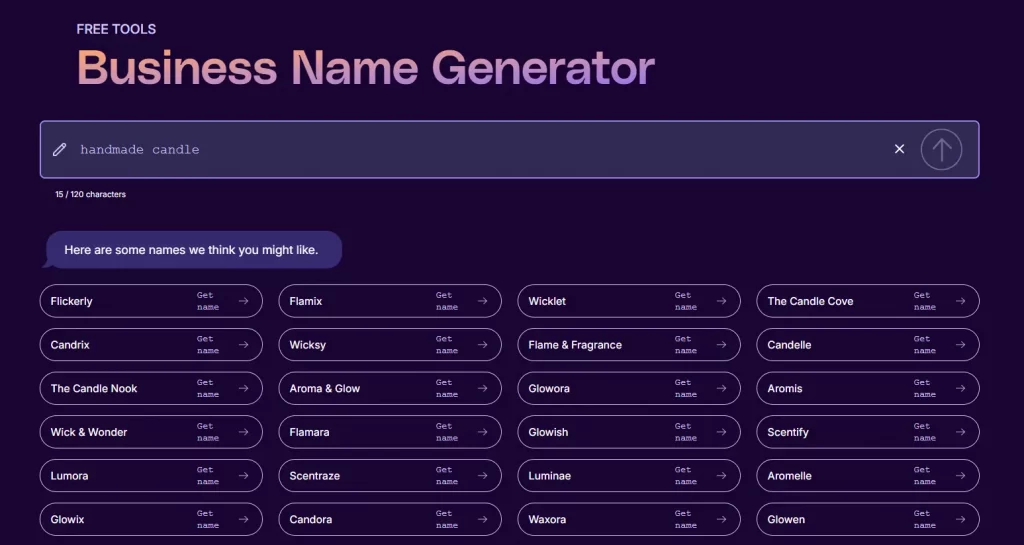
Step 4: Check domain availability and register
Once you have a shortlist, click any name card to see the full domain availability details. If your chosen ‘.com’ is available, the tool will prompt you to register it through Shopify. Domain registration is a paid step (typically around $14 USD per year through Shopify), but bundling it with your store setup saves time and keeps everything in one account.
If your preferred domain is taken, either choose a different name from your shortlist or go back to Step 2 and try a slightly different seed keyword.
Step 5: Claim your Shopify store with the chosen name
After confirming your domain, the generator flows directly into Shopify’s store creation flow. You will be prompted to start a free trial, at which point your new business name is pre-filled as your store name.
Step 6: Prepare to launch your Shopify store
Finding your name is the milestone, but it is not the finish line. Let’s explore how to create a Shopify store without coding.

Don’t forget to match your store name to a social media handle. Inconsistent handles — @YourBrand on Instagram but @YourBrand_official on TikTok might create friction for customers trying to find you and dilute your brand authority. Before finalising your name, run it through Namechk to see availability across all major platforms simultaneously. Ideally, you want an exact match handle on Instagram, TikTok, Pinterest, and X.
Tips to get better results from the Shopify Name Generator
The default flow works well, but applying a little strategy to how you use the business name generator Shopify makes a significant difference in the quality of your results.
Use an emotional or sensory keyword, not a category keyword
Category keywords like “shoes” or “jewelry” produce predictable results. Emotional or sensory keywords like “bold,” “serene,” or “glow” produce more distinctive, brandable names. Think about how you want customers to feel when they interact with your brand, and use that as your seed.
Try multiple keywords and compare shortlists
Run three to five separate searches with different seed keywords and build a combined shortlist. You will notice that some names appear across multiple searches; those are often the strongest options, since they resonate with multiple angles of your brand.
Prioritise names under 12 characters
Shorter names are easier to type, remember, and fit cleanly on packaging, social handles, and email addresses. If a name is longer than 12 characters, ask yourself whether it can be shortened without losing meaning.


Say it out loud before committing
Read your shortlisted names aloud. Check for unintended words hiding inside the name, awkward syllable breaks, or sounds that are hard to say quickly. Your customers will say your brand name in conversation, and it needs to flow.
Consider your future product range
Avoid names that are so specific they box you in. If you start selling handmade soy candles but plan to expand into home fragrance and wellness products, a name like “SoyCandleCo” will feel limiting within two years. Aim for a name with enough breadth to grow with you.
Conclusion
A great business name can make your brand more memorable, easier to market, and better positioned for long-term growth. While finding the right name often takes time, the Shopify Business Name Generator makes the process significantly easier by turning a simple idea or keyword into dozens of potential brand names within seconds. Take the time to test different keywords, evaluate your options carefully, and think beyond your current product line. The name you choose today could become the foundation of your brand for years to come.
If you’re selling on Shopify and need a professional invoice solution, then Vify Shopify Order Printer app is the best choice for you. Try it for free today and experience it for yourself. We’re confident you’ll love it.