


For many ecommerce brands, Shopify Facebook Ads are a key driver of customer acquisition and sales growth. With over 3 billion monthly active users and one of the most sophisticated purchase-intent targeting systems ever built, Facebook remains one of the highest-ROI paid channels available. Let’s discover how to set up and run profitable Shopify ads Facebook campaign for your store effectively step-by-step and turn ad spend into real revenue.
Why Facebook Ads and Shopify are a powerful combination
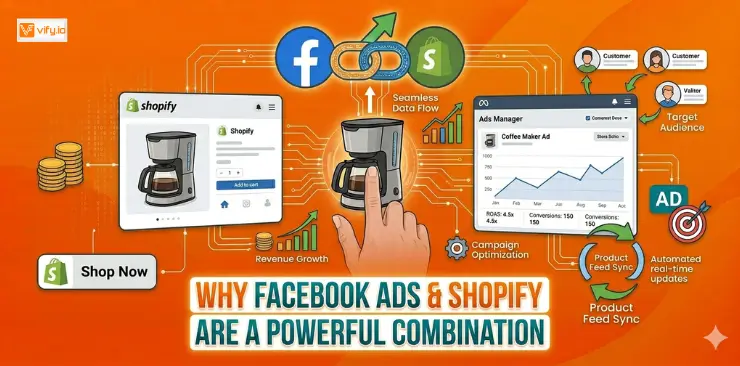
For ecommerce businesses looking to scale efficiently, Shopify and Facebook create a highly effective combination. The strengths of each platform complement one another, making it easier for merchants to attract customers, track performance, and generate sales.
Facebook’s audience reach is unmatched for e-commerce. Beyond raw numbers, Facebook’s ad platform lets you target users based on purchase behaviors, life events, interests, and remarkably specific demographic filters. You’re reaching people who have already demonstrated buying intent in your niche.
Shopify’s native integrations reduce setup friction. The Meta (Facebook) & Instagram app in the Shopify App Store lets you sync your product catalog, install the Meta Pixel, and connect your Business Manager in a single workflow. Compared to building this same infrastructure on a custom-coded storefront, Shopify merchants can go from zero to a live catalog ad in under an hour.
The return on ad spend (ROAS) benchmarks are real. Industry data consistently shows that e-commerce brands using Shopify with Facebook Ads achieve an average ROAS of 2x–4x, with well-optimized stores regularly hitting 5x–8x during peak seasons.
Preparing before running Shopify Facebook Ads
A successful Facebook Ads with Shopify campaign starts long before your first ad goes live. Establishing the right tracking and account infrastructure is essential for accurate data collection, campaign optimization, and long-term profitability. Many Shopify merchants struggle to generate consistent results simply because these foundational steps were overlooked during setup.
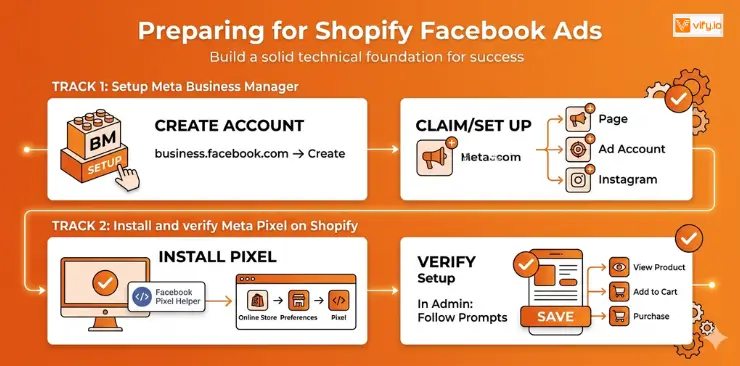
Create and configure Meta Business Manager
The first step is setting up a Meta Business Manager account, which serves as the central location for managing your advertising assets. From there, you can control Facebook Pages, ad accounts, user permissions, product catalogs, and other business resources from a single dashboard.
After creating your Business Manager account, make sure to:
- Add or claim your Facebook Business Page
- Create an advertising account
- Connect your Instagram profile if you plan to advertise on Instagram as well
- Assign access permissions to team members or marketing partners when necessary
Having everything organized within Business Manager makes campaign management significantly easier as your advertising efforts scale.
Connect Meta Pixel to your Shopify store
The Meta Pixel is one of the most important tools in your advertising setup. It tracks key customer actions across your store, including page views, product views, add-to-cart events, checkout activity, and completed purchases. This data allows Meta to measure performance accurately and optimize campaigns toward users who are most likely to convert.
To connect the Meta Pixel with Shopify:
- In your Shopify admin, go to Online Store → Preferences
- Scroll to the Facebook Pixel section and click Set up Facebook
- This redirects you to the Facebook & Instagram app — follow the prompts to connect your Business Manager and select or create a Pixel
- Once connected, use the Meta Pixel Helper Chrome extension to verify the Pixel is firing correctly on your product pages
How to create a Shopify Facebook Ads campaign
Once your tracking setup and Meta integration are working properly, you can move on to creating your first campaign. At this stage, the decisions you make around objectives, audience targeting, and campaign structure will have a major impact on overall performance.
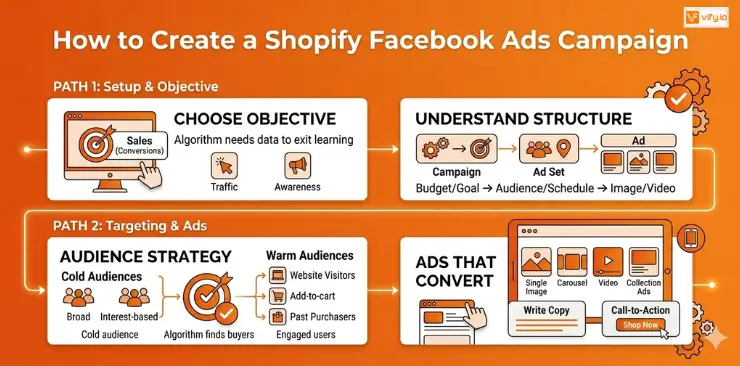
Choose the right campaign objective
Facebook Ads Manager asks you to choose an objective before anything else. This choice tells Facebook’s algorithm what result to optimize for, so it matters.
For Shopify stores, here’s how to think about it:
- Sales (Conversions): the default choice for most Shopify campaigns. Facebook optimizes for purchase events. Requires your Pixel to have recorded at least 50 purchase events in the past 7 days to exit the learning phase effectively.
- Traffic: sends people to your website. Useful for brand-new stores with zero Pixel data, but don’t expect high purchase rates.
- Awareness/Reach: best for top-of-funnel brand building. Not a direct-response tool.
Understand campaign structure
Facebook Ads uses a three-tier hierarchy:
Campaign → sets the objective and overall budget strategy Ad Set → controls audience targeting, placement, budget, and schedule Ad → the actual creative: image/video, copy, headline, and CTA
One campaign can contain multiple ad sets (different audiences), and each ad set can contain multiple ads (different creatives). Keep this clean: one audience per ad set, two to three ad variations per ad set for testing.
Audience targeting strategy
Cold audiences (new customers who don’t know you):
- Broad targeting: let Facebook’s algorithm find buyers automatically. Works especially well with Advantage+ Shopping Campaigns.
- Interest-based targeting: layer 2–3 relevant interests with a broad demographic.
- Minimum audience size: aim for at least 1–3 million people to give the algorithm room to work.
Warm audiences (people who’ve already engaged with you):
- Website visitors (all visitors, past 30/60/90 days)
- Product page viewers who didn’t purchase
- Add-to-cart abandoners
- Past purchasers (for upsell/repeat campaigns)
Setting the starting budget
Many Shopify merchants underfund their campaigns and then wonder why they don’t convert. The algorithm needs data to learn — and data costs money.
A practical starting framework:
- Daily budget per ad set: Aim for at least 10x your average order value (AOV). If your AOV is $50, start with $50/day minimum per ad set.
- Testing budget: Budget $300–$500 total to test 2–3 ad sets before making optimization decisions.
- Patience window: Give each ad set a minimum of 7 days and 50 optimization events before judging performance.
Facebook Ads Shopify formats that convert
- Single image: Clean, fast-loading, ideal for direct-response offers and simple products.
- Carousel: Show multiple products or angles. Excellent for collections and “reasons to buy” storytelling.
- Video (15–30 seconds): Highest engagement, best for demonstrating product use. Leads with the hook in the first 3 seconds.
- Collection ads: Mobile-only format that opens a full-screen Instant Experience. Outstanding for product discovery.
For most Shopify stores starting out, a strong single-image or short video ad with a clear offer outperforms complex formats. Nail the creative basics before building elaborate experiences.
Writing ad copy
Your ad copy follows a simple structure:
Primary text (first 125 characters are critical): Lead with the problem or desire, then present your product as the solution. Use social proof if possible.
Headline (below the image/video): State the offer or key benefit directly. “Free shipping on orders over $50” or “A moisturizer that actually works overnight.”
Call-to-action button: “Shop Now” is the default for e-commerce and outperforms most alternatives. “Learn More” works for higher-consideration products.
Common Shopify Facebook Ads mistakes
Even well-structured campaigns can underperform when a few common mistakes go unnoticed. Identifying these issues early can help protect your advertising budget and improve overall campaign efficiency.
Targeting too narrow from the start. Many advertisers assume that narrowing their audience as much as possible will improve performance. In practice, the opposite is often true. Meta’s algorithm performs best when it has enough data and audience volume to identify potential buyers.
When audience sizes become too small, delivery can become inefficient, CPMs may increase, and optimization opportunities become limited. Broad targeting strategies or larger lookalike audiences often provide stronger results during the early stages of a campaign. Additional targeting restrictions should be introduced only after performance data clearly supports them.

Pausing ads too early. Every new campaign or ad set goes through a learning period while Meta gathers data and determines the most effective delivery patterns. During this stage, performance can fluctuate significantly as the system tests different audience segments, placements, and bidding opportunities.
One of the most common mistakes is turning campaigns off or making major edits too quickly. Frequent changes can restart the learning process, delaying optimization and making it harder for the algorithm to stabilize. In most cases, it’s best to allow campaigns enough time and data before evaluating results.
Ignoring creative fatigue. Even high-performing ads eventually lose effectiveness as audiences become familiar with them. When users repeatedly see the same creative, engagement rates often decline and advertising costs begin to rise.
Monitoring metrics such as click-through rate (CTR), frequency, and conversion performance can help identify creative fatigue before it becomes a significant issue. Updating images, videos, headlines, or ad copy on a regular basis helps maintain engagement and keeps campaigns performing efficiently over time.
Mixing cold and warm audiences in the same ad set. Prospecting audiences and remarketing audiences typically respond to different messaging and should be treated separately.
People who have never interacted with your brand often need educational or awareness-focused content that introduces the product and builds interest. By contrast, visitors who have already viewed products, added items to their cart, or engaged with your business generally require more conversion-focused messaging that addresses objections and encourages action.
Keeping these audience types in separate ad sets allows you to tailor creative, offers, and campaign objectives more effectively, resulting in clearer performance data and stronger overall results.
Conclusion
Shopify Facebook Ads remains one of the most effective growth channels for eCommerce businesses looking to increase traffic, generate qualified leads, and drive consistent sales. By setting up the right tracking infrastructure, choosing the appropriate campaign objectives, targeting the right audiences, and continuously optimizing your creatives, you can maximize your advertising budget and achieve sustainable growth. In summary, combining a well-optimized Shopify store with a strategic Facebook Ads Shopify approach can help turn clicks into customers and create long-term profitability for your business.
If you’re selling on Shopify and need a professional invoice solution, then Vify Shopify Order Printer app is the best choice for you. Try it for free today and experience it for yourself. We’re confident you’ll love it.