


Starting an online store can feel complicated when costs, setup, and daily operations all need to be considered. Shopify for small business offers tools to build an online store, manage products, accept payments, and handle orders in one place. This guide breaks down the main costs of running a Shopify store and explains the key steps to launch, helping small business owners plan their budget and get ready to sell online.
Is Shopify a good fit for small businesses?
Shopify is a hosted ecommerce platform. You pay a monthly subscription and Shopify provides the store, checkout, hosting and security. You do not manage servers or patch software. For a small team, that is the main appeal: your time goes into products and customers instead of technical maintenance.
| Shopify fits well if you… | Shopify may not fit if you… |
|---|---|
| Sell physical products online or in person | Mainly sell services with no products to list |
| Want a store live in days, not months | Only need a one-page site with a contact form |
| Plan to grow past a handful of orders a week | Want zero monthly fees at any volume |
| Want one system for online, social and in-person sales | Need heavy custom features outside a store setup |
| Prefer not to manage hosting or security | Sell in a way that needs a very unusual checkout |
A small business Shopify store typically gains three things:
- Speed to launch. Themes, checkout and payments come pre-built.
- One back office. Orders, inventory, customers and discounts live in one dashboard.
- Room to grow. You can move up plans as volume rises without rebuilding.
The trade-off is that Shopify charges for the convenience. The subscription is the visible cost, but transaction fees and apps often matter just as much, which is why the rest of this guide spends time on cost.

What Shopify plans cost
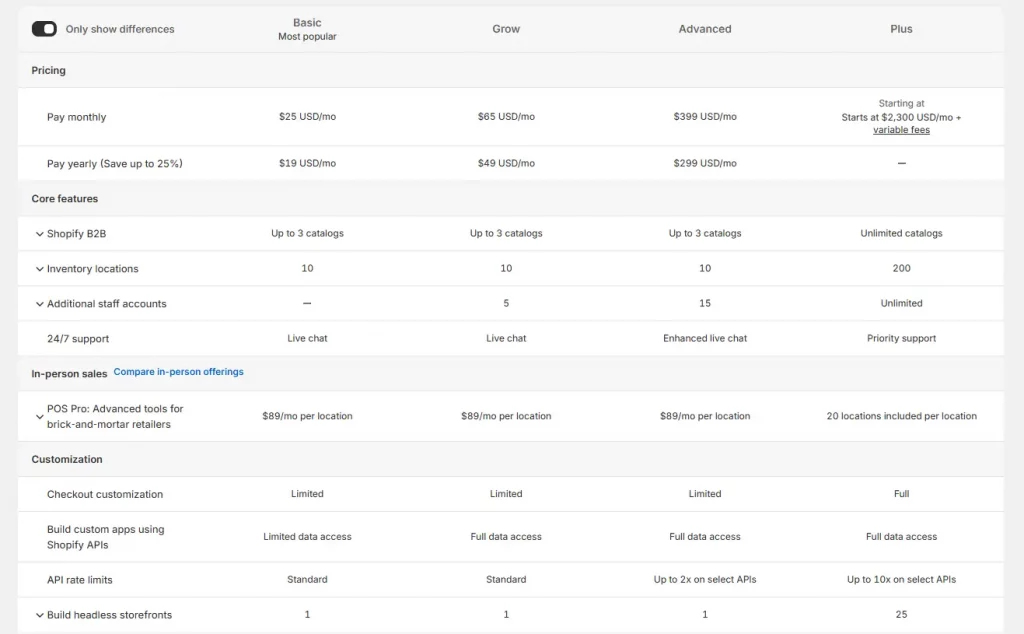
| Plan | Monthly billing | Annual billing (per month) | Best for |
|---|---|---|---|
| Starter | $5 | $5 | Selling through social, messaging and links, without a full website |
| Basic | $39 | $29 | Solo owners and new stores |
| Grow | $105 | $79 | Small teams with steady orders |
| Advanced | $399 | $299 | Higher-volume stores needing advanced reporting |
| Plus | From $2,300 | From $2,300 | Enterprise-scale brands |
Annual billing saves 25% on Basic, Grow and Advanced. Plus pricing depends on contract length and country.
Two other details matter when you compare plans. The first is staff accounts: Grow includes 5 and Advanced includes 15, so a small business that needs team logins will hit Basic’s limits first. The second is the trial. As of now, new merchants get a 3-day free trial, followed by $1 per month for the first 3 months on standard plans. Shopify can change that promotion, so confirm it on the signup page.

The break-even math
Most advice says “start on Basic, upgrade when you grow.” That is reasonable, but at what sales volume does a higher plan pay for itself?
A higher plan costs more per month but charges lower transaction fees. The upgrade makes sense once the fee savings exceed the extra subscription cost.
| Upgrade | Extra plan cost per month | Fee saved per $1 of sales | Break-even monthly sales |
|---|---|---|---|
| Basic to Grow | $50 | 0.2% | about $25,000 |
| Grow to Advanced | $220 | 0.2% | about $110,000 |
If you use a third-party gateway, the break-even drops sharply because the fee gaps are larger:
| Upgrade | Extra plan cost per month | Fee saved per $1 of sales | Break-even monthly sales |
|---|---|---|---|
| Basic to Grow | $50 | 1.0% | about $5,000 |
| Grow to Advanced | $220 | 0.4% | about $55,000 |
The takeaway is that a small business using Shopify Payments has little reason to leave Basic early. A small business Shopify store forced onto a third-party gateway should look at Grow much sooner, sometimes at only a few thousand dollars in monthly sales. Plan features can still justify an earlier upgrade, such as staff accounts or better reporting, but the fee math is the starting point.


Core features that matter for a small business Shopify store
Shopify has a long feature list. When you are running a small business, four areas do most of the work.
1. Checkout and payments. Shopify Payments lets you accept major cards and digital wallets without wiring up a separate processor. It keeps your payments inside one dashboard, which simplifies reconciliation.
2. Point of sale. If you sell at markets, pop-ups or a physical shop, Shopify’s POS connects in-person sales to the same inventory and customer records as your online store. In-person rates are slightly lower than online rates, as shown above. A small business that sells both ways avoids the usual headache of two disconnected stock counts.
3. Built-in email marketing. Shopify Email is free to install and available on all plans. You can send up to 10,000 emails per month at no cost, then pay $1 per 1,000 additional emails. For a small business, that means you can run newsletters and basic automations without a separate subscription at the start. Shopify Magic, Shopify’s AI tooling, can help draft subject lines and email copy, which is useful when you are a team of one writing everything yourself.
4. Inventory and order management. You can track stock, manage orders and handle fulfilment from the same admin. As your catalog grows, apps from the Shopify App Store can extend this, but start with the built-in tools before adding anything.
| Feature | What it replaces | Cost to start |
|---|---|---|
| Shopify Payments | A separate payment processor | Per-transaction fees only |
| Shopify POS | A separate in-person register and stock sheet | Included with plans; in-person card rates apply |
| Shopify Email | A standalone email platform | Free up to 10,000 emails per month |
| Free themes | A custom design build | $0 for free themes |
The point is not that you need every feature. It is that using Shopify for small business lets you assemble a working store with very few paid extras, as long as you resist adding apps before you have a reason.

How to set up a Shopify store
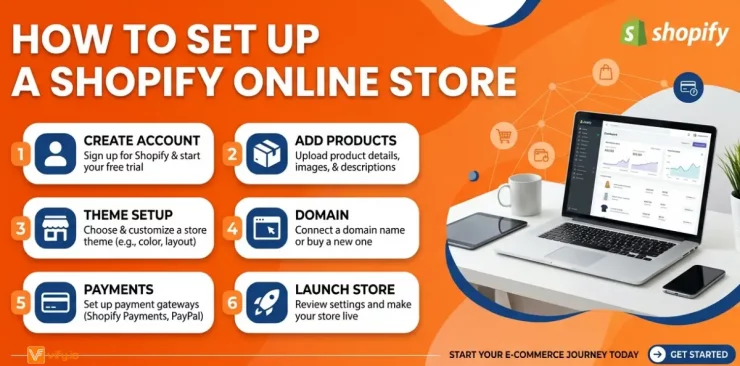
Step 1: Start the trial and choose your plan. Sign up with your email and store name. Pick Basic unless you have a specific reason not to, since you can change plans later.
Step 2: Add your products first. Before touching design, add three to five real products with clear photos, honest descriptions and accurate prices. A theme looks wrong without real content, so this saves you from designing around placeholders.
Step 3: Pick a theme and keep it simple. Start with a free theme. Set your logo, colors and homepage sections. Resist customizing every detail now. A clean, fast, readable store converts better than an elaborate one.
Step 4: Set up payments. Activate Shopify Payments if it is available in your country, or connect another gateway. Add your business details and bank account for payouts.
Step 5: Configure shipping and taxes. Decide your shipping zones and rates, and set up tax collection for the places you sell. This step is easy to rush and expensive to get wrong, so confirm the rules for your location.
Step 6: Add your policy pages and a custom domain. Create refund, shipping, privacy and terms pages. Connect a custom domain so your store looks established.
Step 7: Place a test order, then launch. Buy one of your own products, confirm the order email arrives, then refund yourself. Fix anything odd before you announce the store.
Before launch day, add an email signup form. A small business Shopify that captures emails from the first visit builds an asset that costs nothing to use, thanks to the free email allowance above.
Conclusion
Using Shopify for small businesses works best when you match the plan to your stage and watch the fees, not just the sticker price. Start on Basic, add real products before design work, keep apps minimal, and let the break-even math tell you when to upgrade. Run the numbers for your own order volume using the tables above, then start the trial with a clear plan.
For Shopify stores looking for a professional invoice solution that’s easy to customize without any coding, Vify Shopify Order Printer app is worth considering. Try it for free and see how it fits your store’s needs.