



There’s a moment most Shopify store owners recognize: you’ve outgrown your theme. Maybe it loads too slowly, can’t quite match your brand vision, or you’ve hit a wall trying to customize it without breaking something else. Or perhaps you’re launching fresh and you already know a generic template won’t cut it. Whatever brought you here, Shopify web development services are the answer — and this guide will show you exactly what that means, what’s involved, and how to make the right choice.
What are Shopify web development services?
Shopify website development services refer to the specialized technical work involved in designing and building the front-end of your Shopify store — the visual interface your customers interact with every time they visit.
This is distinct from broader Shopify development services, which cover the full spectrum including back-end logic, app development, and integrations. Web development services are specifically focused on:
- How your store looks (UI design)
- How customers move through it (UX)
- How it’s coded and rendered (front-end development)
- How fast and reliably it loads (performance)
In practical terms, Shopify website development services can mean anything from customizing a premium theme to building a completely bespoke storefront from scratch, or even going headless with a decoupled front end powered by a modern JavaScript framework.


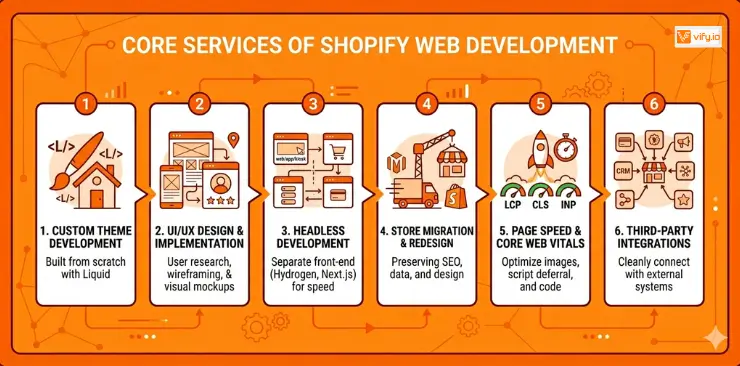
Core services of Shopify web development
A full-service Shopify web development engagement typically covers several interconnected disciplines:
1. Custom theme development
This is the heart of most web development projects. Rather than purchasing a theme and tweaking it, a developer builds your storefront using Shopify’s Liquid templating language.
The result is a theme that fits your brand perfectly, without the visual compromises or hidden limitations of a pre-built template.
2. Storefront UI/UX design & implementation
Good web development services Shopify start with design, not code. This phase includes user research, wireframing, visual mockups, and prototyping — before a single line of Liquid is written. Developers then implement the approved designs with pixel-perfect accuracy.
3. Headless Shopify development
Headless is the most technically advanced form of web development services for Shopify. In a headless setup, Shopify handles the back end (cart, checkout, inventory, payments) while a completely separate front end — typically built in Shopify Hydrogen, Next.js, or Nuxt.js — handles everything the customer sees.
The benefits are significant: near-instant page loads, complete design freedom, and the ability to deliver your storefront across multiple channels (web, mobile app, in-store kiosk) from a single back end. The trade-off is higher development cost and more complexity to maintain.
4. Shopify store migration & redesign
If you’re moving to Shopify from WooCommerce, Magento, or another platform — or if you’re redesigning an existing Shopify store — web development services include a careful migration of your theme, content, and design assets. Done well, this process preserves your SEO equity, redirects old URLs, and gives your store a fresh start without losing years of domain authority.
5. Page speed & core web vitals optimization
A beautifully designed store that loads slowly is a store that loses sales. Web development services often include performance audits and optimization work targeting Google’s Core Web Vitals — specifically Largest Contentful Paint (LCP), Cumulative Layout Shift (CLS), and Interaction to Next Paint (INP). This includes image optimization, script deferral, lazy loading, and theme code cleanup.
6. Third-party integrations
Your store rarely operates in isolation. Web development services frequently include integrating your Shopify storefront with external systems — ERP, CRM, payment gateways, review platforms, marketing tools, and loyalty programs. These integrations are built cleanly into the front end so they enhance the customer experience rather than slowing the store down.
The Shopify web development process
Understanding what actually happens during a web development project helps you prepare better and set realistic expectations with your team.
Step 1: Discovery & Requirements. The developer or agency learns about your brand, your customers, your competitors, and your technical requirements. You’ll discuss design preferences, reference sites, functionality needs, and launch timeline.
Step 2: Wireframes. Low-fidelity wireframes map out the layout and structure of your key pages — homepage, collection pages, product pages, cart, and checkout.
Step 3: Visual Design Mockups. High-fidelity mockups show exactly how your store will look. Typography, color palette, imagery style, and component design are all defined here. Client approval happens before development starts.
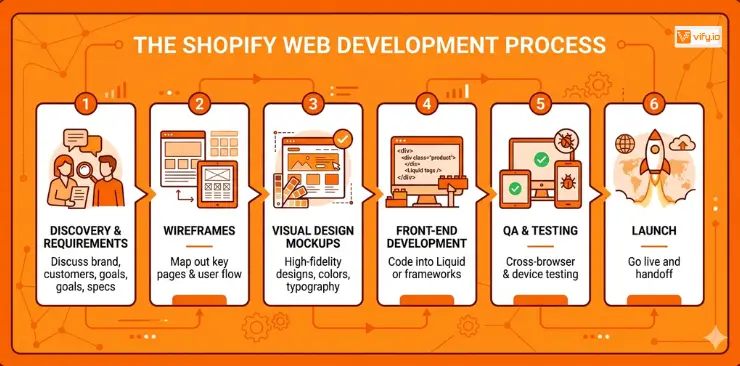
Step 4: Front-End Development. The approved designs are coded in Liquid (or in a JS framework for headless builds).
Step 5: QA & Testing. The store is tested across browsers (Chrome, Safari, Firefox, Edge) and devices (desktop, tablet, mobile). Performance, accessibility, and functional testing all happen here.
Step 6: Launch. DNS is updated, the store goes live, and a post-launch monitoring period begins. Any immediate issues are resolved before the development team formally hands off.
Conclusion
A well-executed Shopify storefront is one of the highest-leverage investments you can make in your ecommerce business. The right Shopify web development services deliver a faster, more conversion-friendly, and more on-brand store experience that pays for itself over time.
For a broader look at what professional development can do for your Shopify store, visit our guide to Shopify development services. And if you need custom functionality that goes beyond the storefront, our guide on Shopify app development services is the next step.
If you’re selling on Shopify and need a professional invoice solution, then Vify Shopify Order Printer app is the best choice for you. Try it for free today and experience it for yourself. We’re confident you’ll love it.