


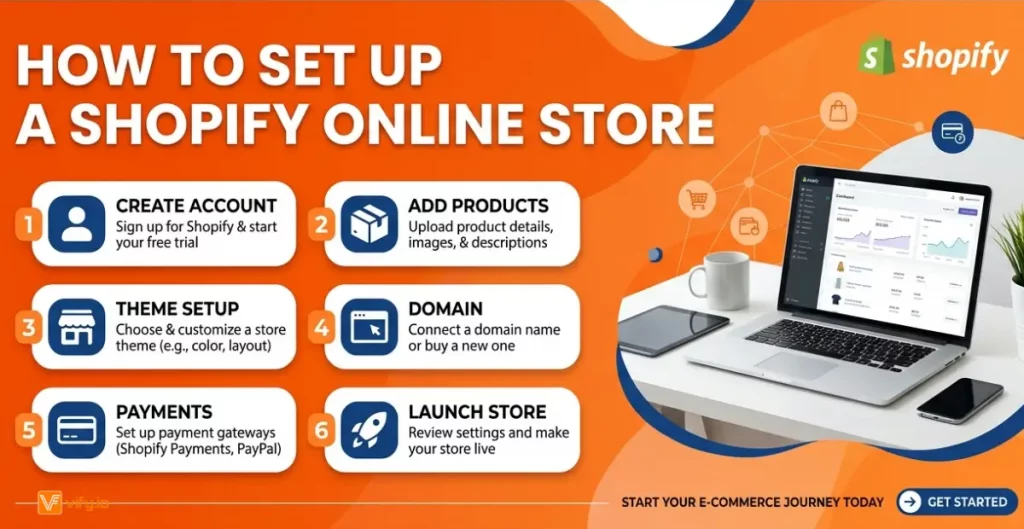
Setting up a Shopify online store is one of the most effective ways to start selling online, but many beginners struggle with where to begin and how to do it right. From choosing the right theme to adding products and configuring payments, each step plays a key role in building a successful Shopify online shop. In this guide, you’ll learn how to set up an online store on Shopify step by step, with practical tips to help you launch faster, avoid common mistakes, and grow your business confidently.
Why Shopify is the #1 Platform to build an Online Store
There is no shortage of platforms for selling online. WooCommerce, Wix, Squarespace, BigCommerce, Etsy — the options are overwhelming. So why do millions of merchants choose Shopify to build their online shop?
The answer comes down to one thing: Shopify was built exclusively for e-commerce. Every feature, every update, every tool in its ecosystem exists to help you sell more easily. Other platforms bolt e-commerce onto a website builder. Shopify started with the store.
All-in-one infrastructure: Your hosting, checkout, payment processing, and storefront are all managed in one place. There are no server configurations, no plugin conflicts, no security certificates to chase.
No-code setup: Shopify’s drag-and-drop editor lets complete beginners build a professional-looking Shopify online shop without writing a single line of code. Sections can be rearranged, colors changed, and fonts swapped in minutes.
Built-in payments: Shopify Payments lets you accept credit cards, debit cards, Apple Pay, Google Pay, and more without a third-party payment processor. It works in most countries and eliminates the transaction fee charged by external gateways.
A world-class app ecosystem: The Shopify App Store has more than 8,000 apps covering everything from email marketing and product reviews to upsells, subscriptions, and loyalty programs. Most essential tools have free-tier versions.
How to Set Up Your Shopify Online Store: Step-by-Step
Setting up a Shopify online store is faster than most people expect. Follow these eight steps in order and you will have a fully functional storefront ready for customization.
Step 1: Start your free Shopify trial
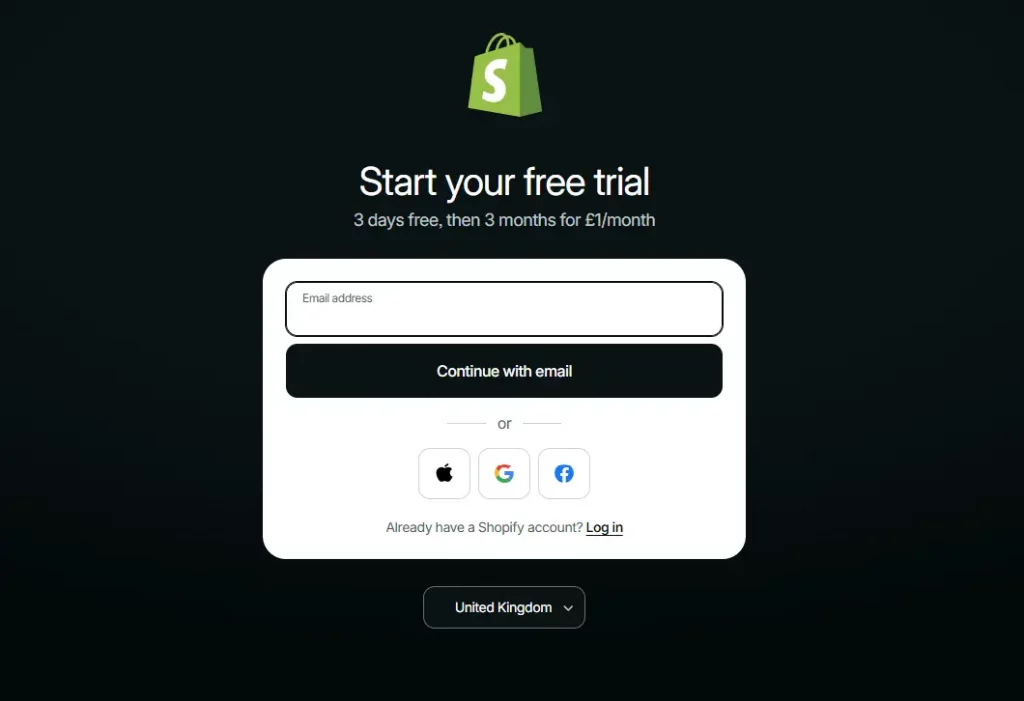
Go to Shopify.com and click ‘Start free trial.’ Enter your email address, create a password, and answer a few onboarding questions about your business stage and goals. Shopify uses these to personalize your dashboard — they do not lock you into any configuration.
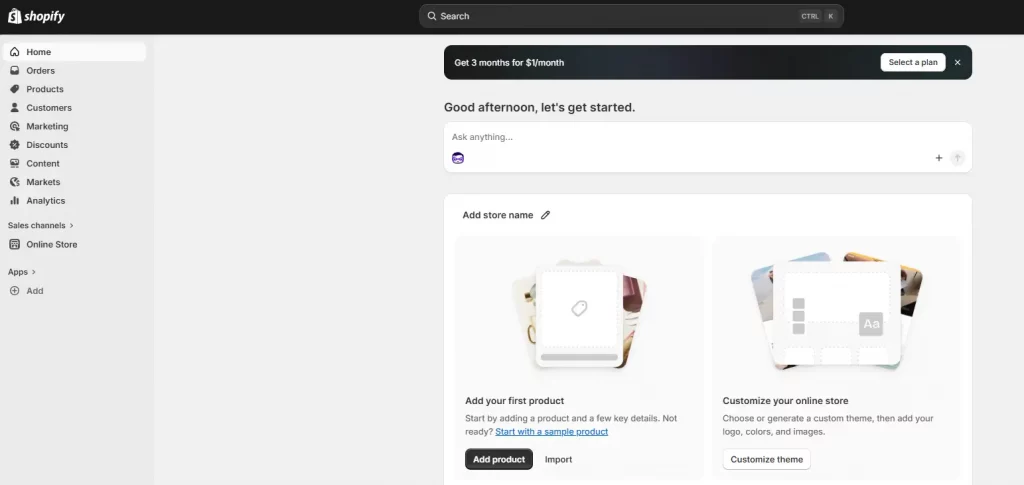
You will land on your Shopify admin — the central hub for everything: products, orders, customers, analytics, and settings. Spend two minutes clicking through the sidebar to get oriented.

Step 2: Name your store and set up your domain
Your store name is set during signup and becomes your default Shopify URL (yourstore.myshopify.com). This subdomain is permanent and cannot be changed, so choose it to reflect your brand.
You should also connect a custom domain (e.g., yourbrand.com) to look professional. You can purchase a domain directly through Shopify for around $14-$16/year, or connect a domain you already own from providers like GoDaddy, Namecheap, or Google Domains. Go to Settings > Domains to manage this.
Step 3: Choose and install a free Shopify template
Your theme controls how your Shopify online shop looks and feels. Go to Online Store > Themes > Visit Theme Store and filter by Free. Shopify offers up to 24 free themes built to professional standards.
🌟 Don’t know which theme is suitable for your online store? Discover Top 12 Best Free Shopify Templates
Tip: Add the theme to your library without publishing it. Customize it first, then go live when you are satisfied. You can always revert to your previous theme instantly.
Step 4: Configure your store settings
Before designing or adding products, complete these foundational settings under the Settings menu:
- General: store name, email, store address, unit system
- Payments: enable Shopify Payments or connect a third-party gateway
- Checkout: contact method, required fields, order processing preferences
- Shipping and delivery: set up zones and rates (covered in detail below)
- Taxes and duties: Shopify can auto-calculate tax rates by region
- Notifications: customize order confirmation, shipping, and abandoned cart emails

Step 5: Build your online shop pages and navigation
Every Shopify online store needs a set of core pages beyond the product catalog. Create these under Online Store > Pages:
- About Us — your brand story, mission, and the people behind the store
- Contact — a simple form so customers can reach you
- FAQ — answers to common questions about shipping, returns, and sizing
- Shipping Policy — delivery timeframes, carriers, and international shipping details
- Return and Refund Policy — your terms, clearly stated
- Privacy Policy — Shopify auto-generates a compliant version under Settings > Policies
Once pages are created, add them to your navigation. Go to Online Store > Navigation and build your Header menu (main navigation) and Footer menu (policy pages and secondary links).
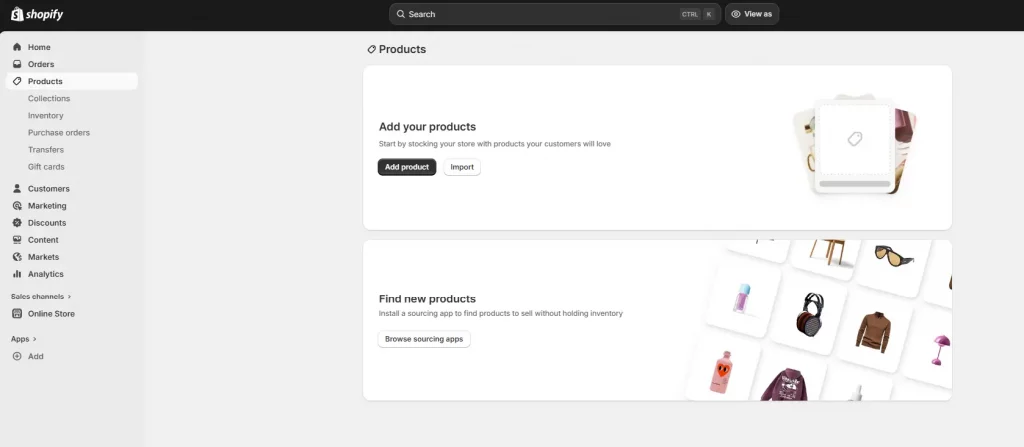
Step 6: Add your products
Go to Products > Add product. For each product, complete:
- Title: clear, keyword-rich, and descriptive
- Description: benefits-focused copy that answers buyer questions and includes relevant search terms
- Images: high-resolution, multiple angles, consistent background — compress before uploading
- Pricing: set your price and optionally a ‘compare at’ price to show a discount
- Inventory: enable tracking, set your quantity, and assign a SKU
- Variants: add options like size, color, or material
- Shipping: enter product weight and dimensions for accurate rate calculation
- SEO preview: customize the page title and meta description for each product
Organize products into Collections (go to Products > Collections). Collections are the category pages of your Shopify online store — think ‘Women’s Tops’, ‘Sale Items’, or ‘New Arrivals’. Customers use them to browse; Google uses them to understand your catalog structure.

Step 7: Set up shipping zones and rates
Go to Settings > Shipping and delivery. Set up shipping zones for each region you sell to (domestic, international, or specific countries). For each zone, create rates:
- Flat rate: a fixed fee regardless of order value or weight
- Free shipping: set a minimum order threshold to qualify
- Calculated rates: real-time rates from carriers like USPS, UPS, FedEx, or DHL
Free shipping thresholds are particularly powerful. Offering free shipping on orders over a certain amount increases average order value and is one of the highest-impact conversion levers available to new stores.
Step 8: Activate payments
Go to Settings > Payments. Shopify Payments is the simplest option — it is built in, requires no third-party account, and activates in minutes. It supports all major credit and debit cards, Apple Pay, Google Pay, and Shop Pay.
If Shopify Payments is not available in your country, or if you prefer a specific processor, connect a third-party gateway such as PayPal, Stripe, or a local provider. Note that using a third-party gateway incurs an additional transaction fee (0.5% to 2%, depending on your Shopify plan).
Always run a test order before going live. Go to Settings > Payments > Enable test mode, place an order, and confirm the checkout flow works end-to-end on both desktop and mobile.
Wrap-up
Building a successful Shopify online store is not just about completing the setup — it’s about creating a strong foundation that supports growth, scalability, and a seamless customer experience. By following the step-by-step process outlined in this guide, you can confidently launch a fully functional store, avoid common beginner mistakes, and position your business for long-term success. Whether you’re starting your first online store on Shopify or refining an existing one, the key is to stay consistent, test what works, and continuously optimize every part of your store to drive better results.
If you’re selling on Shopify and need a professional invoice solution, especially one that’s easy to customize without any coding skills, then Vify’s Shopify Order Printer app is the best choice for you. Try it for free today and experience it for yourself. We’re confident you’ll love it.