


Imagine opening a store on the busiest street in the world — but keeping the shutters closed. That’s exactly what happens when merchants ignore Shopify search engine optimization. While many brands pour money into ads, long-term ecommerce growth often comes from organic traffic that keeps compounding over time. With the right SEO for Shopify strategy, your products can appear in front of high-intent customers actively searching for what you sell — without paying for every click. In this complete guide, you’ll learn how to optimize your Shopify store for search engines, improve rankings, increase visibility, and build a stronger foundation for sustainable ecommerce growth.
Understanding how Shopify search engine optimization works
Before optimizing anything, it helps to understand how Google interacts with your Shopify store specifically, because Shopify has some quirks that do not exist on custom-built sites.
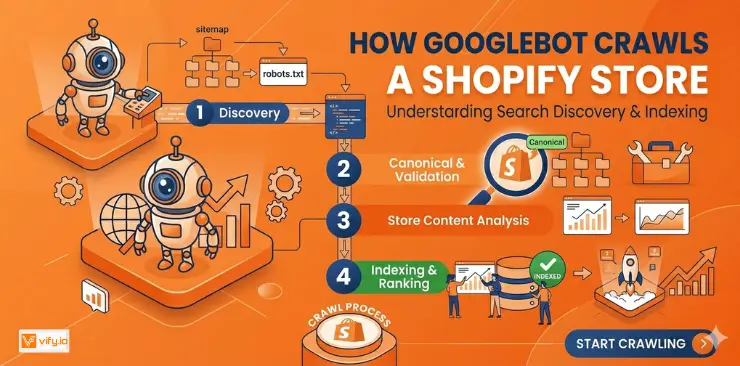
How Googlebot crawls a Shopify store
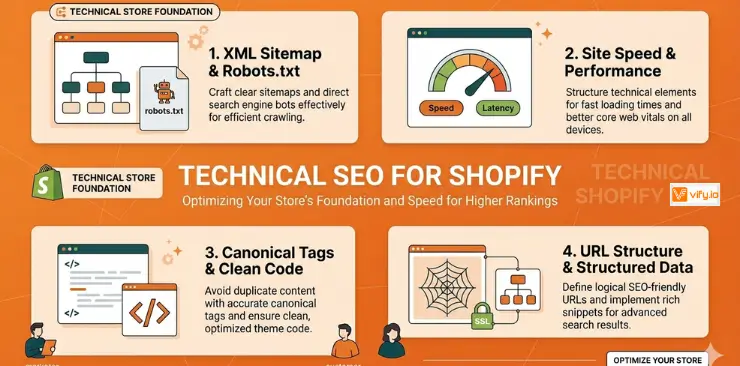
When Googlebot visits your store, it follows links across your pages, reads your HTML, and decides what to index. Shopify automatically generates a sitemap.xml at yourstore.com/sitemap.xml that lists all your products, collections, blog posts, and pages. Submitting this to Google Search Console is one of the first things you should do with any new Shopify store.
Shopify also auto-generates canonical tags for each page, which helps Google identify the preferred version of a URL. This is particularly important because Shopify creates multiple URL paths for the same product (for example, a product can be accessed via /products/product-name or via /collections/collection-name/products/product-name). Without canonical tags, Google might see these as duplicate pages and split your ranking signals.
Common Shopify SEO limitations
Shopify is excellent for ecommerce but it does have structural SEO challenges:
- Duplicate content from collection paths: the same product can appear under multiple collection URLs. Canonical tags help, but internal linking discipline matters too.
- URL structure is fixed: Shopify forces /products/, /collections/, and /pages/ prefixes. You cannot change this without a headless setup.
- Large collection pages can create thin, hard-to-crawl paginated URLs.
Keyword Research for your Shopify Store
Effective SEO for Shopify store growth begins with finding the right keywords — the exact phrases your potential customers type into Google when they are ready to buy. Not all keywords are equal: a high-volume keyword with strong commercial intent is worth ten times a high-volume informational keyword.
Understanding search intent in ecommerce
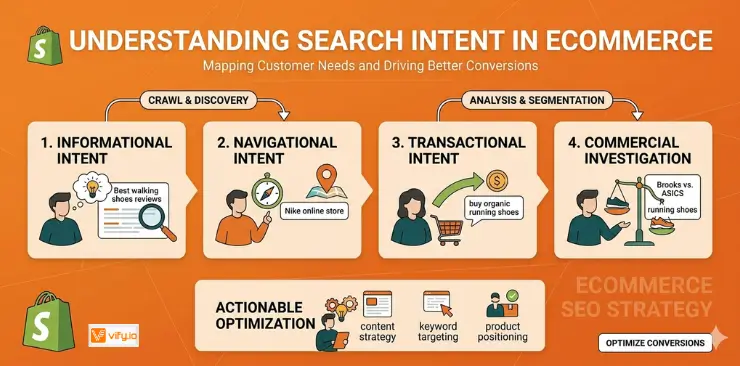
Before you research keywords, understand the four types of search intent and where they lead customers in your funnel:
- Transactional intent: ‘buy running shoes online’, ‘best wireless headphones under $100’ — these drive direct sales. Target on product and collection pages.
- Commercial investigation: ‘best running shoes for flat feet’, ‘AirPods vs Sony WH-1000XM5’ — these drive research-phase buyers. Target in blog posts and comparison guides.
- Informational intent: ‘how to clean leather sneakers’ — these build brand awareness and earn backlinks. Target in blog posts and how-to guides.
- Navigational intent: ‘Nike official store’ — people looking for a specific brand. Optimize your homepage and brand pages for your own name.
Mapping keywords to Shopify page types
A common mistake is targeting the same keyword everywhere. Each page type should own a distinct keyword:
- Product pages: target specific, transactional keywords — ‘men’s merino wool t-shirt’ or ‘stainless steel water bottle 32oz’.
- Collection pages: target category-level keywords — ‘organic cotton clothing’, ‘eco-friendly water bottles’. These are high-value, high-volume pages.
- Blog posts: target informational and commercial investigation keywords — ‘how to choose a water bottle for hiking’.
On-Page Shopify SEO Optimization
On-page SEO is everything you control directly in the content and HTML of your pages. For search engine optimization Shopify covers the basics with its editor — but there is much more you can do to stand out.
Writing SEO-optimized title tags and meta descriptions
Your title tag is the single most important on-page SEO element. It tells both Google and users what the page is about. For Shopify, edit it under Online Store > Pages/Products/Collections > Search engine listing preview.
Title tag best practices for Shopify:
- Keep it under 60 characters
- Place your primary keyword as close to the front as possible
- Include your brand name at the end for brand recognition: ‘Organic Cotton T-Shirts | YourStore’
- Make it compelling for users
Meta description best practices:
- Keep it between 120 and 160 characters
- Include your primary keyword naturally (Google bolds it in results when it matches the query)
- Include a clear call to action: ‘Shop now’, ‘Free shipping over $50’, ‘See the full collection’
- Every page should have a unique meta description — avoid leaving Shopify to auto-generate them from product descriptions
URL structure best practices
While Shopify forces certain URL prefixes (/products/, /collections/), you control the slug — the part after the prefix. Keep slugs short, descriptive, and keyword-rich:
- Good: /products/merino-wool-t-shirt-men
- Avoid: /products/mens-amazing-super-soft-merino-wool-t-shirt-blue-large
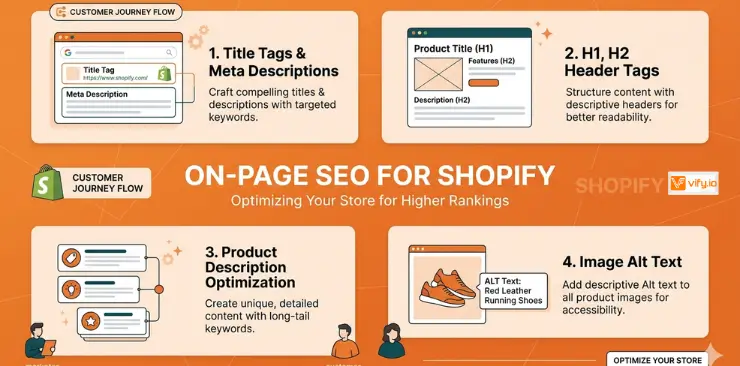
Image optimization
Images are often the largest files on a Shopify product page, making them the biggest drag on load speed. Optimize every image before or after uploading:
- File name: use descriptive, keyword-rich names before uploading
- Alt text: describe the image naturally and include your keyword where it fits
- File format: use WebP wherever possible. It is 25-35% smaller than JPEG at equivalent quality.
- Dimensions: do not upload 4000px images if your theme displays them at 800px. Resize before uploading.
Recommendation: Learn about how to optimize Shopify images effectively.
Internal linking strategy
Internal links pass authority between pages and help Google understand your site structure. Build a deliberate internal linking network:
- Link from blog posts to relevant product and collection pages
- Link from product pages to related products and the parent collection
- Link from your homepage to your most important collection pages
- Use descriptive, keyword-rich anchor text
Technical SEO for Shopify Stores
Technical SEO ensures that search engines can crawl, understand, and index your Shopify store without obstacles. You can have the best content in the world but if Google cannot render your pages, you will not rank.
Fixing duplicate content
Duplicate content is Shopify’s biggest technical SEO challenge. It happens in several ways:
- Product URLs: /products/blue-t-shirt and /collections/mens-tops/products/blue-t-shirt both work. Shopify adds canonical tags pointing to the /products/ version, which helps, but your internal links should consistently point to the canonical URL
- Variant pages: if you have 20 color/size variants, they can create near-duplicate pages. Use canonical tags to point all variants to the main product page
Site speed and Core Web Vitals
Google’s Core Web Vitals are now a confirmed ranking factor. The three metrics that matter most for Shopify stores:
- Largest Contentful Paint (LCP): how quickly your largest image or text block loads. Target under 2.5 seconds. Optimize your hero images and use a fast CDN (Shopify’s CDN is already good).
- Cumulative Layout Shift (CLS): how much your page jumps around as it loads. Reserve space for images by specifying width and height attributes. Avoid ads or banners that load after the main content.
- Interaction to Next Paint (INP): how quickly your page responds to user input. Minimize unused JavaScript from apps you are not actively using.
The fastest way to improve Core Web Vitals on a Shopify store:
- Audit your installed apps and remove any you do not use
- Compress and convert images to WebP
- Use a lightweight, performance-optimized theme
Recommendation: Discover Top 12 Best Free Shopify Templates.
Mobile-first indexing
Google indexes the mobile version of your site first. Since most Shopify themes are responsive by default, this is less of a concern than it used to be — but still worth checking:
- Test every page in Google’s Mobile-Friendly Test tool
- Make sure font sizes are readable on small screens
- Ensure tap targets (buttons, links) are at least 48px tall
- Avoid pop-ups that cover the main content on mobile
Conclusion
Mastering Shopify search engine optimization is not about chasing quick wins — it’s about building a long-term traffic engine that keeps bringing qualified customers to your store month after month. The good news is that effective SEO for Shopify does not require a massive budget or advanced technical skills to get started. By consistently optimizing your product pages, improving user experience, and creating content that matches customer search intent, you can increase organic traffic, improve rankings, and reduce your dependence on paid advertising. In ecommerce, the stores that invest in SEO early are often the ones that dominate their niche later.
If you’re selling on Shopify and need a professional invoice solution, then Vify’s Shopify Order Printer app is the best choice for you. Try it for free today and experience it for yourself. We’re confident you’ll love it.