
Most Shopify stores focus heavily on product pages and marketing, but overlook one customer touchpoint that quietly impacts trust and professionalism: the invoice. A poorly designed invoice can make your business feel generic, while a polished, branded one reinforces credibility and creates a smoother post-purchase experience. In this guide, you’ll learn how to customize invoice templates on Shopify step by step, discover practical design tips for beginners, and explore a custom invoice sample collection to help you create polished, branded invoices without coding experience.
Why you should customize Shopify Invoice
Shopify’s default invoice is functional. But “functional” is not the same as “impressive.” Here is why taking the time to customize your Shopify invoice is worth every minute:
Brand consistency across every touchpoint. You spend money on a polished storefront, product photography, and social media presence. The invoice is often the last branded communication a customer receives before leaving your ecosystem. A generic invoice breaks that chain. A branded one reinforces it.
Legal compliance in certain markets. If you sell to customers in the EU, UK, or other regulated markets, your invoices may be required by law to include specific fields: your VAT registration number, your registered business address, a unique sequential invoice number, and an explicit tax breakdown. A default Shopify order confirmation often does not meet these requirements.
Customer trust and repeat purchases. A professional, clearly formatted invoice signals that you are a real, established business — not a side project. Studies consistently show that perceived professionalism at the post-purchase stage increases the likelihood of a repeat order. A custom invoice with a thank-you note or a small discount code for the next order is one of the cheapest retention tools available.
What information does a Custom Invoice include?
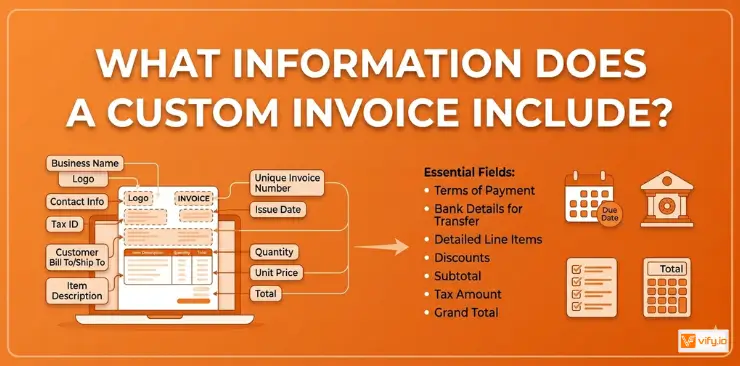
Before you dive into the how, it helps to understand what a solid custom invoice should contain. Think of it in two layers:
Standard required fields
Every invoice — regardless of how it looks — needs these fields to be functional and legally sound:
- Seller information: Your business name, address, email, and phone number
- Buyer information: Customer name and shipping/billing address
- Invoice number: A unique, sequential reference number
- Invoice date: The date the order was placed or the invoice was issued
- Order number: Your Shopify order reference
- Line items: Product names, SKUs, quantities, and unit prices
- Subtotal, discounts, shipping, and taxes: Each is broken out separately
- Total amount due: Clear, prominent, and in the correct currency
- Payment status: Whether the invoice has been paid
Optional branding fields
These are what separate a forgettable invoice from a branded asset:
- Logo: Placed prominently in the header
- Brand colors: Used for section dividers, the header background, or accents
- Custom footer message: A thank-you note, your return policy URL, or a discount code for the next order
- Social media handles or website URL
- Custom fonts: Matching your storefront typography
Ways to customize Invoice on Shopify
There is no single right way to customize your Shopify invoice. The best method depends on how much control you want, your technical comfort level, and your budget.
Edit the Default Shopify Order Notification Email
This is the quickest option and costs nothing. Shopify sends an order confirmation email to customers after every purchase. You can edit this template directly from your admin panel.
How to do it:
- Go to your Shopify admin and navigate to Settings → Notifications
- Scroll down to the Order section and click Order confirmation
- You will see an HTML/Liquid template editor. Here you can:
- Add your logo by inserting an
<img>tag pointing to your hosted logo URL - Change the header background color to match your brand
- Add a custom thank-you message at the top or bottom of the email
- Include a discount code for the next purchase
- Add your logo by inserting an
Limitations to be aware of:
This method only affects the email notification — not a separate PDF invoice. If your customers need a downloadable, printable document for expense reporting or accounting purposes, this approach alone will not be sufficient. It also does not give you per-order customization; every order gets the same template.
Use a Shopify Invoice App
This is the most popular way to fully customize Shopify invoices, and for good reason. Dedicated apps give you a drag-and-drop template editor, automatic PDF generation, and the ability to send invoices as attachments with zero manual work.
Top apps to consider:
- Vify Order Printer PDF Invoice App — the widely used Shopify invoice generator app with easy customization.
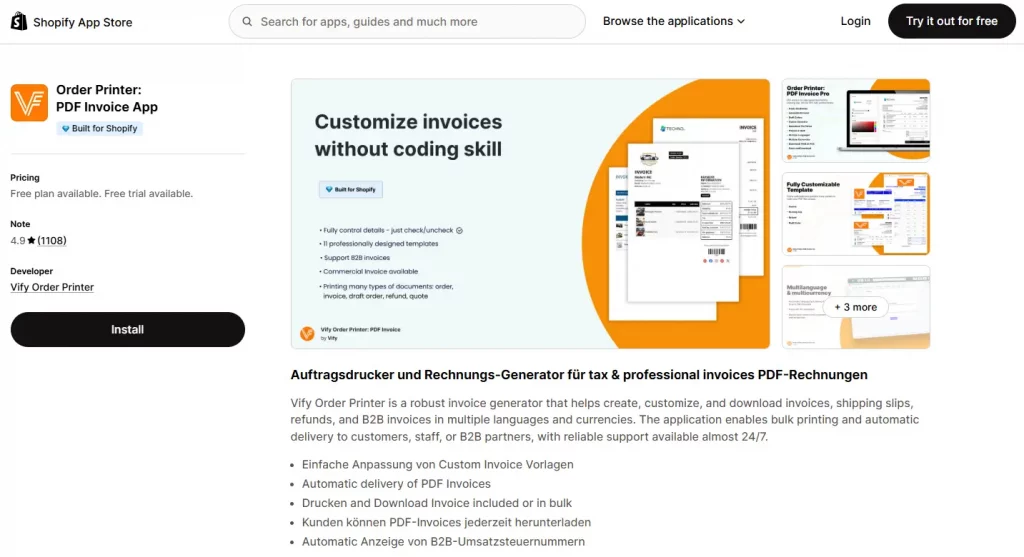
Vify offers a balanced combination of template customization, automated emailing, and multi-language support at a competitive price point. Merchants at all technical levels can easily customize professional invoice templates with no-code. The app generates invoices, packing slips, refund receipts, and supports automated PDF emails triggered by order events.
One key advantage is its pricing model. While other apps often charge based on the number of orders processed, Vify offers unlimited orders on all paid plans — making it a more cost-effective option, especially for growing and high-volume stores.
Pricing: Free plan available. Paid plans from $10.99/month.
- Sufio — built for professional B2B invoicing, with strong EU compliance features including VAT validation and sequential invoice numbering. Starts at $7/month. No free plan available.
- Avada Invoice PDF — a viable option for budget-conscious merchants who need multiple document types like refunds and delivery notes without paying from day one. Starts at $15/month.
Custom Invoice Sample — What a Great Invoice Looks Like
To make this concrete, here is what a well-structured custom invoice sample looks like:
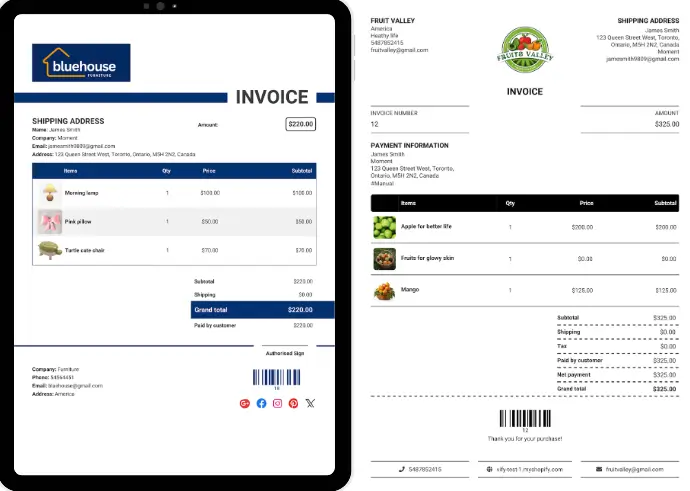
A professional invoice does more than provide payment details — it reinforces your brand identity, improves customer trust, and creates a more polished post-purchase experience. Clean layouts, clear order information, and branded elements like your logo and colors can make even a simple invoice feel significantly more credible and professional.
To make customization easier, Vify Order Printer PDF Invoice App now offers fully customizable invoice templates completely free. The app includes a library of pre-built custom invoice sample templates that you can install with just one click, then personalize with your own branding, typography, colors, and business information — no coding required.
Whether you want a minimalist invoice for a modern fashion brand, a detailed VAT invoice for international orders, or a more premium-looking layout for wholesale customers, Vify gives beginners a fast and practical way to create professional invoices in minutes. Instead of building templates from scratch, merchants can simply choose a ready-made design, customize it to match their store, and instantly start sending polished PDF invoices to customers automatically.
Conclusion
Taking the time to customize invoice templates on Shopify is a small change that can create a much stronger customer experience. A professional invoice helps your store look more credible at every stage of the customer journey. Whether you choose to edit Shopify’s default notifications or use a dedicated app like Vify, the key is creating a custom invoice that reflects your brand and delivers clear, professional information to customers. Starting with a ready-made custom invoice sample can also save hours of design work while helping beginners launch polished invoices faster and more efficiently.
If you’re selling on Shopify and need a professional invoice solution, especially one that’s easy to customize without any coding skills, then Vify’s Order printer app Shopify is the best choice for you. Try it for free and experience it for yourself. We’re confident you’ll love it.