

If you’ve ever walked into a fast food restaurant and been asked “do you want the combo meal?”, you’ve already experienced the power of bundling. The same psychology works just as well in ecommerce — and Shopify gives you solid tools to pull it off. This guide covers everything you need to know about creating a Shopify product bundle: what it is, why it works, which method to use, and how to set up the perfect product bundle app. Let’s get started.
What is a Shopify Product Bundle?
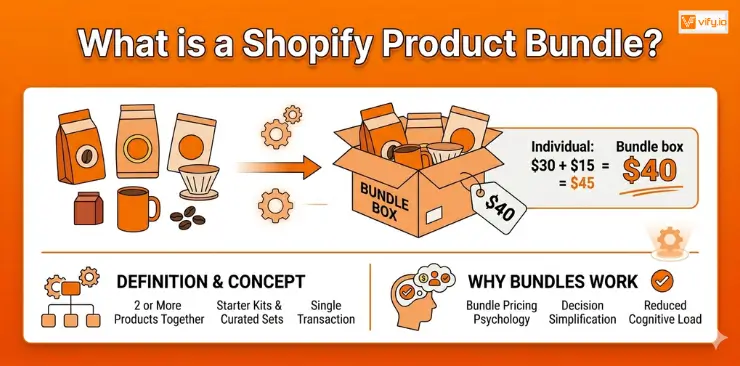
A product bundle in Shopify is a group of two or more products sold together as a single unit — often at a combined or discounted price. Instead of a customer buying one item, they buy a curated set, a starter kit, or a “frequently bought together” package in a single transaction.
Bundling is not a new concept. Retailers have done it for decades in physical stores. What makes it powerful in a Shopify context is that you can control exactly how bundles appear, how they’re priced, and how inventory is tracked — all from within your store.
Definition and core concept of bundling
At its core, a Shopify product bundle is about presenting more value in one click. You group products that make sense together and give customers a reason to buy the set rather than just one item. That reason could be a discount, convenience, a gift-ready presentation, or simply a better experience.
In Shopify, a bundle can be set up in several ways: as a new product listing that combines existing items, as a variant of an existing product, or using a dedicated bundling feature or app. The right method depends on your store’s size, the complexity of the bundle, and how you need inventory tracked.
Why bundles work
Customers don’t just buy products — they buy perceived value. When a $30 item and a $15 item are sold together for $40 (instead of $45), the customer feels like they’re getting a deal, even if the discount is modest. This is called bundle pricing psychology, and it consistently outperforms selling products individually.
There’s also the decision simplification effect. When someone is shopping for a gift or putting together a skincare routine, being offered a ready-made set reduces cognitive load. They don’t have to figure out what goes with what — you’ve done it for them. That ease is itself a reason to buy.
Why you should bundle products
Bundles are one of the highest-leverage strategies available to a Shopify merchant. They don’t require you to acquire new customers — they get more value from the customers you already have.
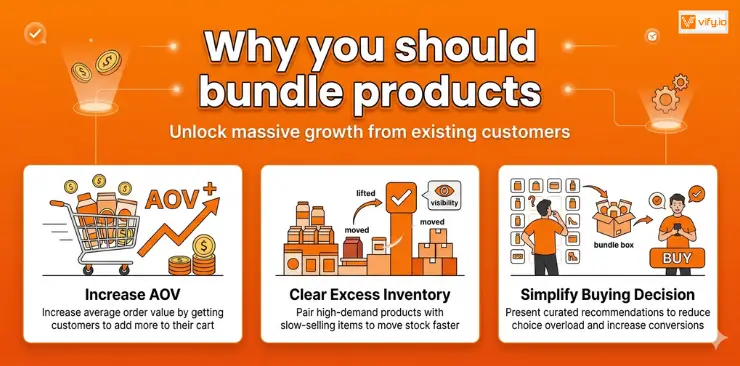
Increase average order value (AOV)
Average order value is one of the three levers of ecommerce revenue (alongside traffic and conversion rate), and it’s often the easiest to move. When a customer is already on your product page and ready to buy, offering a bundle that adds $15 or $25 to their cart is far cheaper than running a paid ad to acquire a new customer.
A well-constructed bundle can lift AOV by 15–30% depending on the discount offered and how relevant the items are to each other.
Move slow-selling or excess inventory
Bundles are a clean way to clear inventory without running a sitewide discount that trains customers to wait for sales. You can pair a high-demand product with a slower-moving item, giving the slower item visibility and velocity it wouldn’t otherwise get. This is especially useful for seasonal stock or products that are being phased out.
Simplify the buying decision for customers
Choice overload is a real conversion killer. When customers are faced with dozens of options, many of them leave without buying anything. Bundles reduce that friction by presenting a curated recommendation. You’re not asking the customer to figure out the right combination — you’re telling them “here’s what works together.” That confidence translates to higher conversion rates.
Types of Shopify bundle products
Not all Shopify product bundles are the same. The right bundle type depends on your product catalog, your margin structure, and what your customers are trying to accomplish.
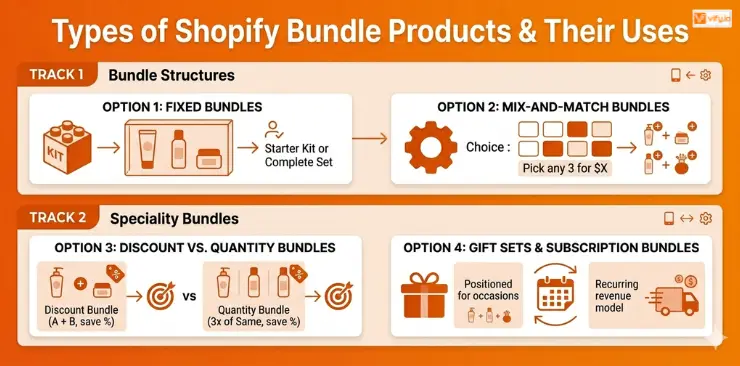
Fixed bundles
A fixed bundle is a set combination of products that customers buy exactly as presented. Think “Starter Kit” or “Complete Set.” The contents are non-negotiable. This is the simplest type to set up and works best when you have a clear, logical grouping — like a skincare routine (cleanser + toner + moisturizer) or a desk setup (mousepad + cable organizer + desk lamp).
Fixed bundles are easy to merchandise, easy to photograph, and easy for customers to understand. They’re the go-to format for most Shopify stores starting out with bundling.
Mix-and-match bundles
A mix-and-match bundle lets customers build their own bundle from a defined selection. For example: “Pick any 3 candles for $45.” This format works well for stores with a large catalog of similar items — supplements, skincare products, apparel basics, coffee blends, and so on.
Mix-and-match bundles are more complex to set up and typically require a dedicated app, but they deliver a highly personalized experience that many customers prefer.
Discount bundles vs. quantity bundles
A discount bundle offers a price reduction for buying a combination of different products together (eg, buy product A + B and save 20%). A quantity bundle rewards buying multiples of the same product (eg, buy 3 and get 10% off). Both work, but they serve different goals.
Discount bundles are better for cross-selling complementary products. Quantity bundles are better for increasing purchase frequency and rewarding loyal buyers..
Gift sets and subscription bundles
Gift sets are fixed bundles packaged and positioned specifically for gifting occasions. They convert well during holidays and tend to attract customers who are buying for someone else — a segment that often spends more per transaction than self-purchasers.
Subscription bundles combine the recurring revenue model with bundling logic. Customers subscribe to receive a curated set of products on a regular cadence. These require a subscription app alongside a bundling strategy and are more complex to execute, but the lifetime value of a subscription bundle customer is typically very high.
How to create a Shopify product bundle
Method 1: Create bundle products manually in Shopify admin
This is the most straightforward approach and requires no apps. The idea is to create a new product in your Shopify admin that represents the bundle, then manage inventory manually.
Step 1: In your Shopify admin, go to Products > Add product.
Step 2: Name the bundle clearly (eg, “Morning Routine Starter Kit”) and write a description that highlights the value of the combination, not just the individual items.
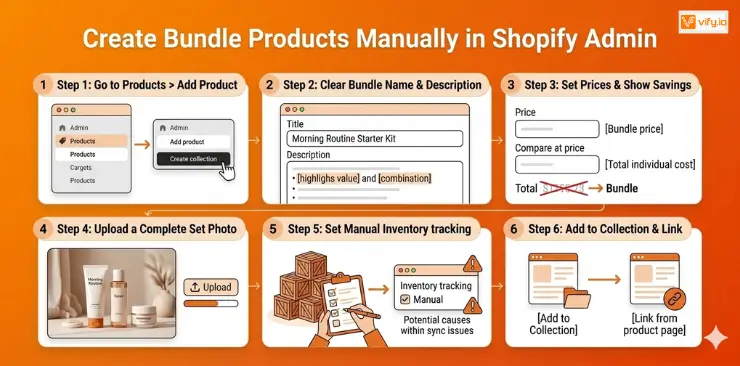
Step 3: Set the price to the bundle price (the combined or discounted total). Use the Compare at price field to show what the items would cost individually — this makes the savings immediately visible to customers.
Step 4: Upload a product photo that shows all items together. Lifestyle photos of the complete set outperform flat lays of individual items.
Step 5: Set inventory to track manually. Since Shopify won’t automatically sync bundle inventory with the underlying component products, you’ll need to update stock manually when items sell.
Step 6: Add the bundle to a relevant collection and link it from the individual product pages using the product description or a custom section.
This method works well for stores with a small number of bundles and low to moderate order volume. The main limitation is inventory tracking — if a component product sells out individually, the bundle won’t automatically reflect that.
Method 2: Use a third-party bundle app
For advanced bundling needs — mix-and-match bundles, tiered bundle discounts, upsell-at-cart functionality, or subscription bundles — a third-party app gives you significantly more flexibility than the native feature.
Apps can handle complex pricing rules, display bundles as widgets on product pages or in the cart drawer, and provide analytics on bundle performance. If your bundling strategy requires this level of customization, a dedicated app is worth the monthly cost.
Looking for the right app to power advanced bundle features in your store? Check out our detailed comparison of the 5 best Shopify bundle apps.
Conclusion
A well-executed Shopify product bundle strategy can be one of the most profitable improvements you make to your store this year — without touching your ad spend or acquisition funnel. The key is to start simple, choose complementary products, and price the discount so it’s meaningful to customers while remaining profitable for you. Start with one fixed bundle based on your top-selling product and its most logical companion. Measure the impact on AOV after 30 days. Then iterate from there. Your store is now ready to expand further.