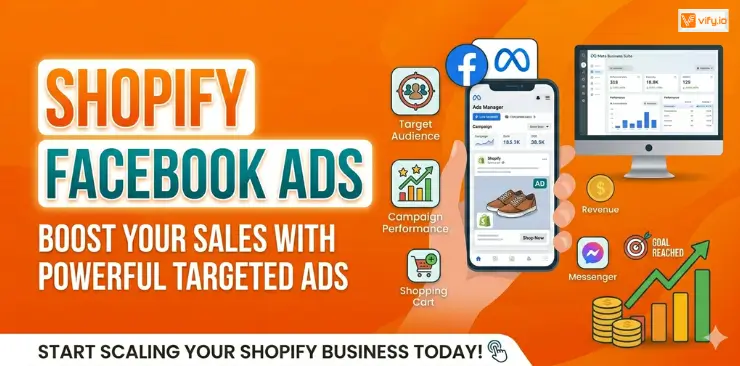
If you’re running a Shopify store and not using Facebook Ads, you’re leaving a significant revenue stream untapped. With over 3 billion monthly active users and one of the most sophisticated purchase-intent targeting systems ever built, Facebook remains one of the highest-ROI paid channels available to e-commerce brands. Let’s discover how to set up and run Shopify Facebook Ads for your store effectively step-by-step and turn ad spend into real revenue.
Why Facebook Ads and Shopify are a powerful combination
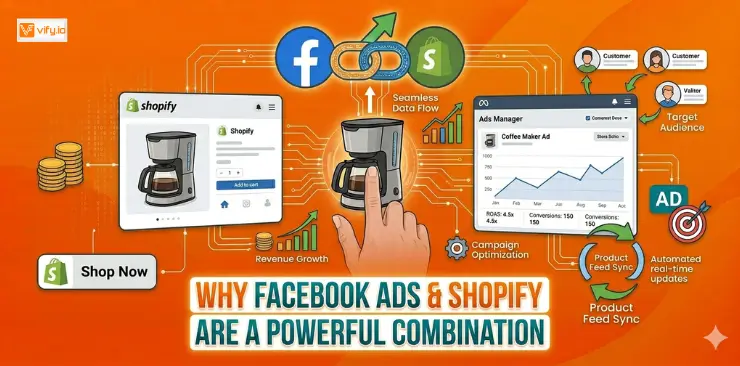
When it comes to running Facebook Ads with Shopify, the two platforms were practically built for each other.
Facebook’s audience reach is unmatched for e-commerce. Beyond raw numbers, Facebook’s ad platform lets you target users based on purchase behaviors, life events, interests, and remarkably specific demographic filters. You’re reaching people who have already demonstrated buying intent in your niche.
Shopify’s native integrations reduce setup friction. The Meta (Facebook) & Instagram app in the Shopify App Store lets you sync your product catalog, install the Meta Pixel, and connect your Business Manager in a single workflow. Compared to building this same infrastructure on a custom-coded storefront, Shopify merchants can go from zero to a live catalog ad in under an hour.
The return on ad spend (ROAS) benchmarks are real. Industry data consistently shows that e-commerce brands using Shopify with Facebook Ads achieve an average ROAS of 2x–4x, with well-optimized stores regularly hitting 5x–8x during peak seasons.
Preparing before running Shopify Facebook Ads
Before spending a single dollar on Facebook Ads Shopify, you need to build the right technical foundation. Skipping this step is the number-one reason Shopify merchants waste their ad budget. Get this right once, and everything downstream becomes measurably more effective.
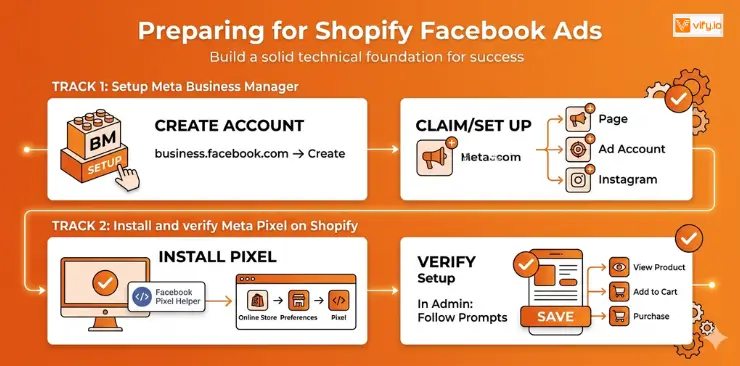
Set up Meta Business Manager
Head to Facebook Business and create a Business Manager account. This is your central hub for managing ad accounts, pages, and team access. Keep your personal Facebook account separate — Business Manager is designed for exactly this purpose.
Once inside, create or claim your Facebook Page, set up your Ad Account, and connect your Instagram account if applicable.
Install and verify Meta Pixel on Shopify
The Meta Pixel is a small piece of JavaScript code that fires tracking events every time someone visits your store, views a product, adds to cart, or completes a purchase. Without it, Facebook cannot optimize your campaigns for conversions.
To install it on Shopify:
- In your Shopify admin, go to Online Store → Preferences
- Scroll to the Facebook Pixel section and click Set up Facebook
- This redirects you to the Facebook & Instagram app — follow the prompts to connect your Business Manager and select or create a Pixel
- Once connected, use the Meta Pixel Helper Chrome extension to verify the Pixel is firing correctly on your product pages
How to create a Shopify Facebook Ads campaign
With the foundation in place, you’re ready to build your first campaign.
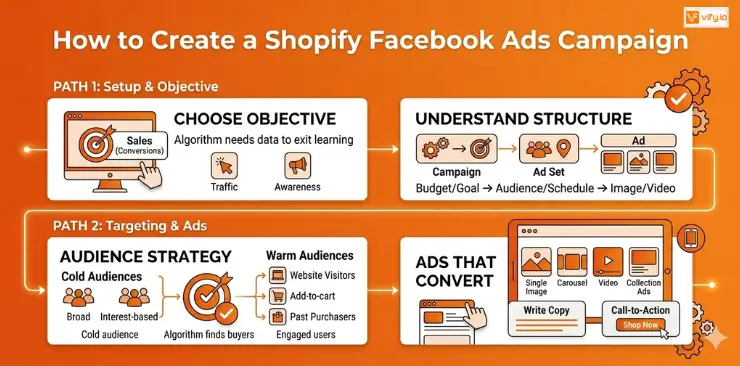
Choose the right campaign objective
Facebook Ads Manager asks you to choose an objective before anything else. This choice tells Facebook’s algorithm what result to optimize for, so it matters.
For Shopify stores, here’s how to think about it:
- Sales (Conversions) — the default choice for most Shopify campaigns. Facebook optimizes for purchase events. Requires your Pixel to have recorded at least 50 purchase events in the past 7 days to exit the learning phase effectively.
- Traffic — sends people to your website. Useful for brand-new stores with zero Pixel data, but don’t expect high purchase rates.
- Awareness/Reach — best for top-of-funnel brand building. Not a direct-response tool.
Understand campaign structure
Facebook Ads uses a three-tier hierarchy:
Campaign → sets the objective and overall budget strategy Ad Set → controls audience targeting, placement, budget, and schedule Ad → the actual creative: image/video, copy, headline, and CTA
One campaign can contain multiple ad sets (different audiences), and each ad set can contain multiple ads (different creatives). Keep this clean: one audience per ad set, two to three ad variations per ad set for testing.
Audience targeting strategy
Cold audiences (new customers who don’t know you):
- Broad targeting: let Facebook’s algorithm find buyers automatically. Works especially well with Advantage+ Shopping Campaigns.
- Interest-based targeting: layer 2–3 relevant interests with a broad demographic.
- Minimum audience size: aim for at least 1–3 million people to give the algorithm room to work.
Warm audiences (people who’ve already engaged with you):
- Website visitors (all visitors, past 30/60/90 days)
- Product page viewers who didn’t purchase
- Add-to-cart abandoners
- Past purchasers (for upsell/repeat campaigns)
Setting the starting budget
Many Shopify merchants underfund their campaigns and then wonder why they don’t convert. The algorithm needs data to learn — and data costs money.
A practical starting framework:
- Daily budget per ad set: Aim for at least 10x your average order value (AOV). If your AOV is $50, start with $50/day minimum per ad set.
- Testing budget: Budget $300–$500 total to test 2–3 ad sets before making optimization decisions.
- Patience window: Give each ad set a minimum of 7 days and 50 optimization events before judging performance.
Facebook Ads Shopify formats that convert
- Single image: Clean, fast-loading, ideal for direct-response offers and simple products.
- Carousel: Show multiple products or angles. Excellent for collections and “reasons to buy” storytelling.
- Video (15–30 seconds): Highest engagement, best for demonstrating product use. Leads with the hook in the first 3 seconds.
- Collection ads: Mobile-only format that opens a full-screen Instant Experience. Outstanding for product discovery.
For most Shopify stores starting out, a strong single-image or short video ad with a clear offer outperforms complex formats. Nail the creative basics before building elaborate experiences.
Writing ad copy
Your ad copy follows a simple structure:
Primary text (first 125 characters are critical): Lead with the problem or desire, then present your product as the solution. Use social proof if possible.
Headline (below the image/video): State the offer or key benefit directly. “Free shipping on orders over $50” or “A moisturizer that actually works overnight.”
Call-to-action button: “Shop Now” is the default for e-commerce and outperforms most alternatives. “Learn More” works for higher-consideration products.
Common Shopify Facebook Ads mistakes
Even experienced store owners fall into these traps. Recognizing them early saves thousands in wasted spend.
Targeting too narrow from the start. A common misconception is that tighter targeting means better results. In reality, Facebook’s algorithm needs room to find buyers. Audiences under 500,000 people often starve the algorithm of data and inflate CPMs. Start broad or with a 1–2% Lookalike, then layer restrictions only if the data supports it.
Pausing ads too early. New ad sets enter a “learning phase” where Facebook tests delivery across different audiences and placements. This phase requires roughly 50 optimization events and typically takes 7 days. Pausing before this phase completes resets the learning — and you end up paying for the learning phase twice.
Ignoring creative fatigue. When the same audience sees the same ad more than 3–4 times (track your Frequency metric), performance degrades quickly. Refresh creatives every 3–4 weeks or when CTR drops more than 25% from baseline.
Mixing cold and warm audiences in the same ad set. Cold prospects need awareness-stage messaging. Warm retargeting audiences need urgency and a direct offer. Running them together produces muddled results and wastes budget on the wrong message for the wrong person.
Conclusion
Shopify Facebook Ads remains one of the most effective growth channels for eCommerce businesses looking to increase traffic, generate qualified leads, and drive consistent sales. By setting up the right tracking infrastructure, choosing the appropriate campaign objectives, targeting the right audiences, and continuously optimizing your creatives, you can maximize your advertising budget and achieve sustainable growth. In summary, combining a well-optimized Shopify store with a strategic Facebook Ads Shopify approach can help turn clicks into customers and create long-term profitability for your business.
If you’re selling on Shopify and need a professional invoice solution, then Vify Shopify Order Printer app is the best choice for you. Try it for free today and experience it for yourself. We’re confident you’ll love it.