The Shopify App Store gives merchants access to thousands of apps that extend their store’s functionality, covering areas such as reviews, email marketing, upselling, invoicing, and shipping. However, choosing the right apps takes more than browsing popular listings. App quality, pricing structures, compatibility, and their impact on store performance all deserve careful consideration. This guide explains how the Shopify App Store is organized, what the Built for Shopify badge means, how app billing works, and what to check before installing an app. It also highlights important pricing details, with figures based on information available in November 2026.
What is the Shopify App Store?
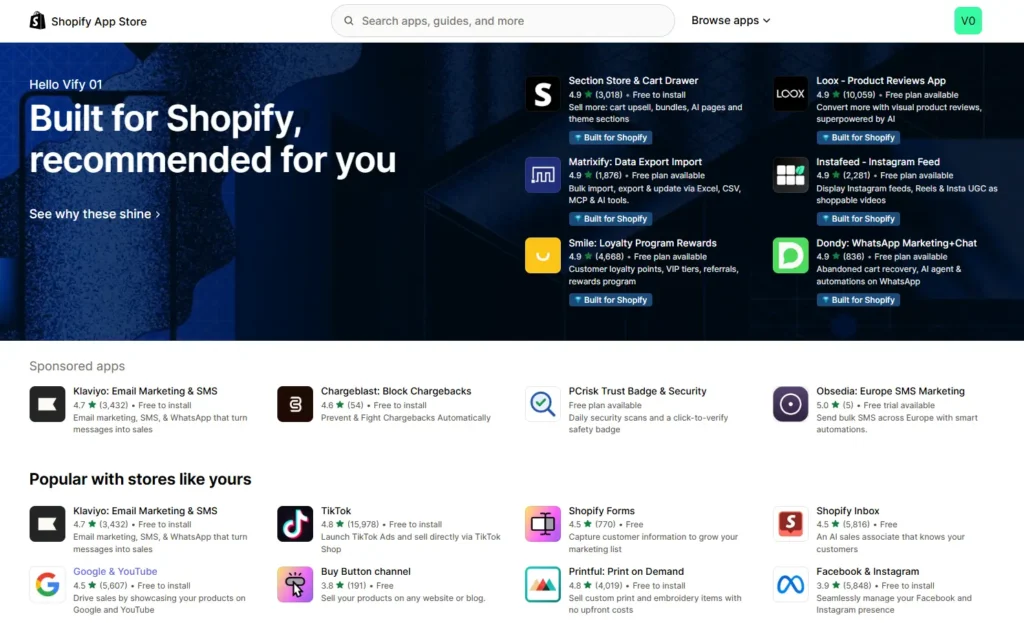
The Shopify App Store is Shopify’s official marketplace for apps built by Shopify and by third-party developers. You can browse it at apps.shopify.com or from the Apps section of your Shopify admin, install an app to your store with a few clicks, and manage billing from the same account that pays for your plan.
The same independent snapshot found that about 51% of live apps have no reviews at all, and only about 1,500 apps, roughly 7%, carry the Built for Shopify badge. The takeaway is not the exact count. It is that choosing well matters, because most listings have little proof behind them.
How to find the right app in Shopify
The app store Shopify runs is searchable by keyword and by category, but categories are feature tags that developers apply to themselves, so many apps carry several or none. Search by the job you need done, not by the category name.
A reliable search routine looks like this:
- Write down the specific problem, such as “send branded invoices automatically” or “show product reviews,” before you open the store.
- Search for that phrase and shortlist three to five apps rather than installing the first result.
- Compare ratings, but weight recent reviews more heavily than old ones.
- Check who the developer is, how long the app has been listed, and how fast they reply to support.
- Look at the pricing tiers at your expected order volume, n ot just the entry price.
Before you search at all, check whether Shopify already covers the need. Shopify includes native tools such as Flow, Translate & Adapt, and Shopify Email, and a built-in feature does not add a monthly app fee or another script to your storefront.
What the Built for Shopify badge means
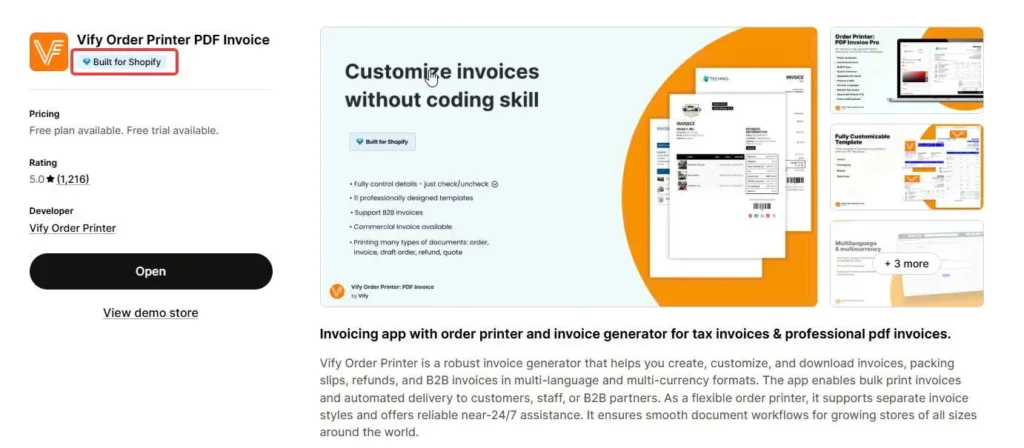
Shopify marks the apps that meet its highest standards for performance, design, and integration with the Built for Shopify badge. It is a useful filter, but it has limits.
| Question | What the badge tells you | What it does not tell you |
|---|---|---|
| Is the app fast? | Its impact on your storefront is capped at 10 Lighthouse points, with limits on admin speed and checkout performance | How it affects your specific theme and other apps |
| Is it well built? | It uses current integration standards, such as the latest App Bridge, and does not edit your theme files through the Asset API | Whether its features fit your business |
| Is it proven? | It has at least 50 net installs from active paid-plan stores, at least 5 reviews, and a minimum recent rating | Whether merchants are satisfied with support or pricing |
| Is it still maintained? | Shopify reviews badged apps each year and gives developers 60 days to fix failures | Whether it is the cheapest or best option for you |
A few practical points follow. A new app cannot qualify yet, so an excellent app without the badge is still worth considering. Badged apps also rank higher in App Store search, so a top result is partly an effect of the badge. Treat the badge as one signal, and read it alongside reviews and pricing.
How Shopify app pricing and billing work
App costs are the layer merchants most often underestimate. Our guide to Shopify fees covers the other layers, such as plan and payment charges. This section covers how apps are billed, based on Shopify’s Help Center.
Pricing models
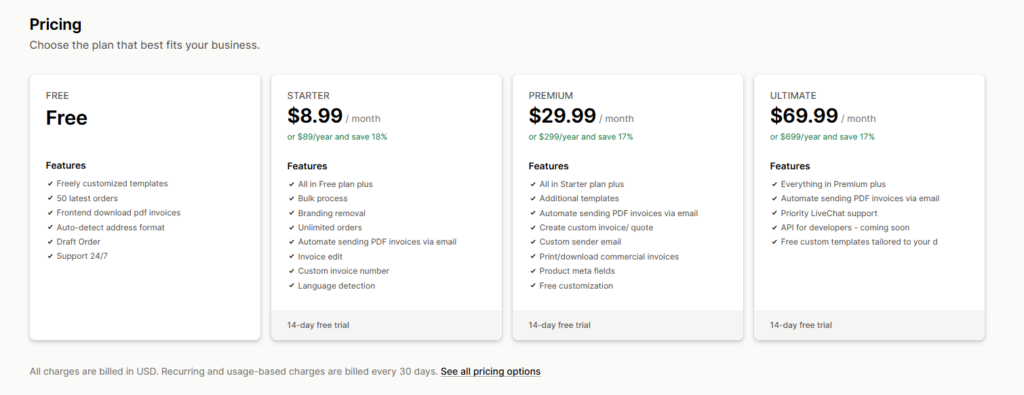
Apps use a few common models. Some are free, many have a free plan with paid upgrades, and many paid apps offer a free trial. Charges can be a recurring subscription, a usage-based fee, or a one-time payment. A free plan is an ongoing, limited allowance. A free trial gives full access for a fixed period and then charges you.
How charges appear on your bill
- Recurring app charges are included in your Shopify bill every 30 days, but each app has its own separate 30-day billing cycle, which affects when the charge appears.
- App charges are added as soon as you install and approve an app, but you are not asked to pay until your 30-day bill arrives.
- You can see every active subscription, its price, and its next billing date in your admin under Settings, then Billing, then Subscriptions.
What happens when you uninstall
Uninstalling stops future recurring charges for apps billed through Shopify, but it does not erase a charge that already posted. Because recurring charges are generated when you approve the app and again on the first day of its billing cycle, a charge can appear even if you uninstall after a day or two. If an app bills you outside Shopify, you must cancel the subscription inside that app, because uninstalling does not stop external billing. To stop Shopify billing, you also have to remove the app under Settings, then Apps.
Trials and refunds
Shopify does not extend or reset free trials. If you are still inside your store’s own Shopify free trial, fees for apps you add still apply. Uninstalling during an app’s free trial cancels the subscription before the first charge. For a refund or credit on an app billed through Shopify, use the Get support button on the app page to contact the developer. Credits apply to future App Store purchases and appear on your subscription bill.
Conclusion
The Shopify App Store is an advantage when you use it deliberately and a liability when you install first and review later. Start from the job you need done, check what Shopify already offers, use the Built for Shopify badge as one filter among several, price each app at your future volume, and audit regularly. A smaller, better-chosen set of apps from the app store Shopify provides usually beats a long list.
For Shopify stores looking for a professional invoice solution that’s easy to customize without any coding, Vify Shopify Order Printer app is worth considering. Try it for free today and see how it fits your store’s needs.
FAQs
Are apps in the Shopify App Store free?
Some are, and many offer a free plan with paid upgrades or a free trial before charging. Others charge a subscription, usage fees, or a one-time payment. Check the pricing tiers on each listing at your expected order volume.
What does Built for Shopify mean?
It is a badge for apps that meet Shopify’s standards for performance, design, and integration, including a storefront impact cap of 10 Lighthouse points and a minimum of 50 net installs from active paid-plan stores and five reviews. It does not guarantee that the app fits your needs or that its pricing is the best.
Will I be charged if I uninstall an app?
Uninstalling stops future recurring charges for apps billed through Shopify. However, a charge that already posted can still appear, because charges generate when you approve the app and on the first day of its billing cycle. If an app bills you outside Shopify, you must cancel inside the app.
How do I cancel a Shopify app subscription?
Check Settings, then Billing, then Subscriptions to see whether the app bills through Shopify. If it does, uninstall it under Settings, then Apps. If it bills externally, cancel in the app first and then uninstall.
How do I get a refund for an app?
Use the Get support button on the app’s page to contact the developer. If Shopify billed the charge, the developer can issue a refund or a credit, and credits apply to future App Store purchases.