Choosing the right Shopify email template can make store communications more effective while keeping design and setup costs under control. However, Shopify offers different templates for marketing campaigns and automated notifications, each with its own editing options and costs. This guide explores the best free options, explains how both template types work, and shows how to choose and customize emails that fit your store’s needs without overspending.
Free Shopify email templates
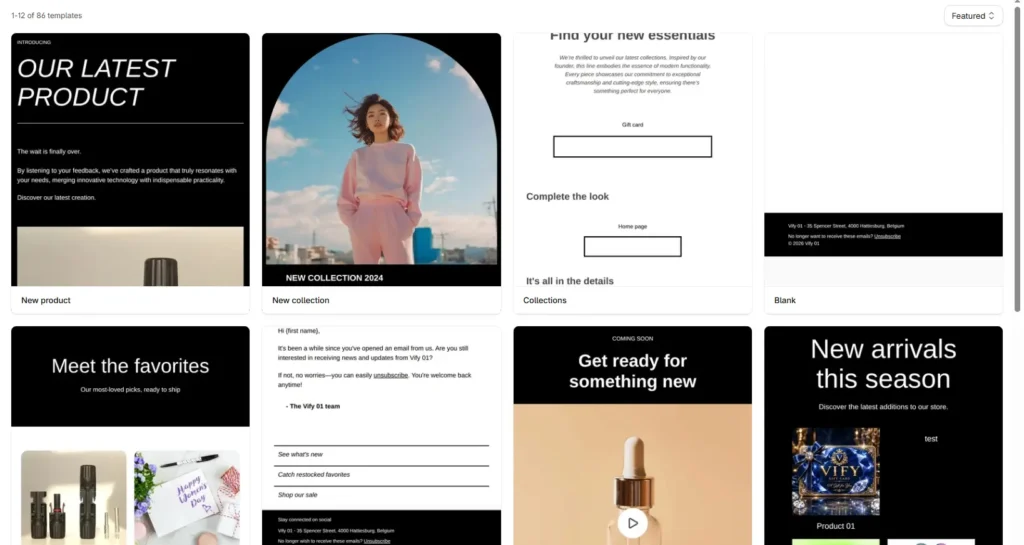
The built-in marketing tool is free to start. According to Shopify, every plan includes 10,000 free emails per month, then $1 per 1,000 emails after that. It provides a drag-and-drop editor with ready-made templates and basic automation templates for the emails most stores need first, such as welcome messages, abandoned cart reminders, and a first-purchase follow-up. You can also connect Shopify Flow for custom triggers.
Three limits are worth knowing before you build around it:
- The built-in tool is designed for simple needs. Third-party reviews describe its automations as basic, with limited branching and segmentation compared with dedicated email platforms.
- Reviewers also note that stores using the same theme can end up with similar-looking emails, so plan to customize colors, images, and copy.
- Free plans from other tools are often tighter. Shopify’s own roundup notes that Klaviyo’s free plan supports up to 250 profiles and 500 monthly emails, and that Mailchimp limits email templates to paid plans.
That last comparison shows how generous the built-in allowance is: 10,000 free emails a month is 20 times Klaviyo’s 500. If you are choosing a tool for a new store, our guide to the Shopify App Store explains how to evaluate paid email apps and what to check before you install one.
What Shopify email costs
The free allowance covers most small stores, but you can outgrow it faster than you expect, because the limit counts every email sent, not subscribers. Volume equals subscribers multiplied by sends per month. The table below uses the published $1 per 1,000 emails above the free 10,000 and assumes four marketing sends per subscriber per month, which is an illustration.
| Subscribers | Emails per month (4 sends each) | Emails above the free 10,000 | Monthly cost |
|---|---|---|---|
| 2,000 | 8,000 | 0 | $0 |
| 5,000 | 20,000 | 10,000 | $10 |
| 20,000 | 80,000 | 70,000 | $70 |
| 50,000 | 200,000 | 190,000 | $190 |
The 2026 rate drops to $0.65 per 1,000 above 300,000 emails and $0.55 above 750,000, but Shopify’s own page states only “from $1 per 1,000,” so confirm the tiers in your admin. Note that automated emails count too. A store with 5,000 subscribers that also sends welcome, abandoned cart, and follow-up automations will cross 10,000 sends sooner than the table suggests.
The best Shopify email templates
The best Shopify email templates are not the prettiest ones. They match a specific moment in the customer journey. Here is what each of the six essential types should do and where you can build it.
| Template | When it sends | What the best version includes | Where to build it |
|---|---|---|---|
| Welcome | A new subscriber joins | A short brand story, a clear next step, and links to best sellers | Built-in automation template or an email app |
| Abandoned cart | A shopper leaves checkout | The exact products and prices they left, plus a one-click return to checkout | Built-in automation template or Shopify Flow |
| First-purchase follow-up | After a first order | A thank-you, usage tips, and a related product | Built-in automation template |
| Order confirmation | Immediately after purchase | Order number, items, address, and what happens next | Settings, then Notifications |
| Shipping confirmation | When an order is fulfilled | A tracking link and the expected delivery window | Settings, then Notifications |
| Promotion or newsletter | A campaign you schedule | One offer, one headline, and one button | Built-in editor or an email app |
Two practical tips improve almost any of these. Show real product images and prices pulled from your catalog instead of a generic reminder, and keep each email to a single main call to action. Your emails also work harder when they look like your store, so match fonts, colors, and imagery with your theme. If you are still choosing a theme, our guide to Shopify website templates covers the options.
How to edit Shopify notification templates
Order and shipping emails are edited in a different place from marketing emails. Shopify’s Help Center says the notification templates under Settings, then Notifications, contain Liquid, which is Shopify’s templating language, plus HTML and CSS.
- From your Shopify admin, go to Settings, then Notifications.
- Choose Customer notifications or Staff notifications.
- Open the template you want, such as Order confirmation.
- Click Edit code to change the HTML, CSS, and Liquid.
- Preview the result, send a test order, and save.
Two warnings matter. Shopify advises editing the code only if you know HTML and CSS and have a basic understanding of Liquid, and saving changes overrides the previous template code. Copy the original code into a document before you edit, because a small Liquid mistake can break dynamic details such as order numbers or line items. Shopify also provides a way to revert customized templates to the default.
Automate gift card emails with VIFY Gift Cards
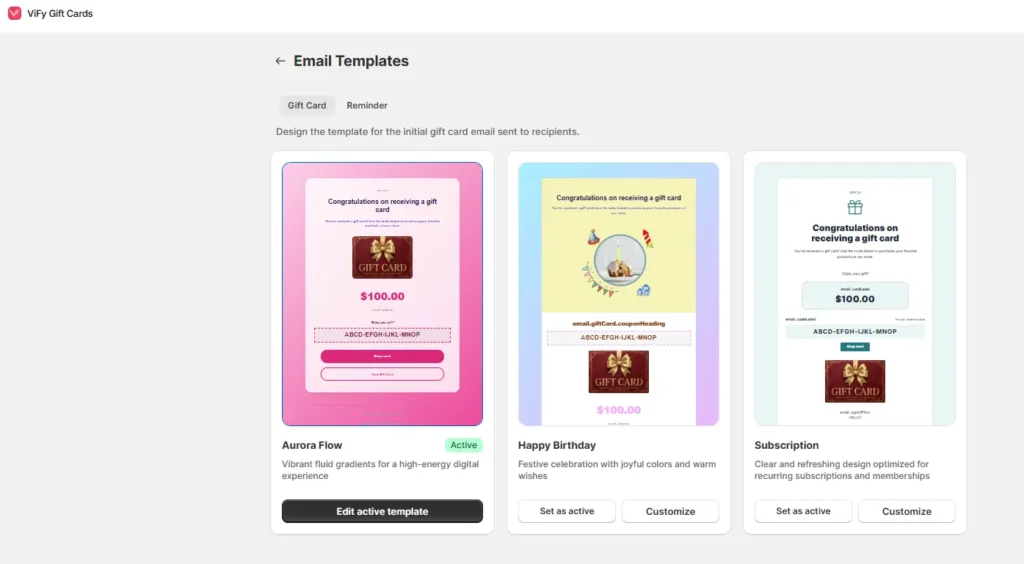
For Shopify stores selling gift cards, a dedicated app can make email delivery easier to manage. VIFY Gift Cards provides customizable email templates that automatically send gift card details to recipients after a gift card is issued. Merchants can choose from different designs, customize the email appearance, and set an active template to match their store’s branding.
The app also includes a separate reminder email template, helping stores manage follow-up communication with gift card recipients. This makes VIFY Gift Cards a useful option for merchants who want more control over gift card emails without manually preparing and sending each message.
Conclusion
Choosing the right Shopify email templates helps create consistent customer communication while keeping email costs manageable. Shopify’s built-in tools cover essential marketing campaigns and store notifications, while specialized apps offer additional options for specific needs, such as automated gift card delivery. For merchants selling gift cards, VIFY Gift Cards is worth considering, with customizable email templates and automated delivery to recipients.
FAQs
Are there free Shopify email templates?
Yes. Shopify’s built-in email tool includes ready-made templates and 10,000 free emails a month on every plan, with $1 per 1,000 emails after that. Several email apps also have free tiers, though their limits are often lower.
Where do I edit my Shopify order confirmation email?
In your Shopify admin, go to Settings, then Notifications, choose Customer notifications, open Order confirmation, and click Edit code. The templates use HTML, CSS, and Liquid, so edit them only if you are comfortable with that code.
What are the best Shopify email templates for a new store?
Start with a welcome email, an abandoned cart reminder, a first-purchase follow-up, and clean order and shipping confirmations. These cover the main moments in the customer journey, and all can be built with Shopify’s own tools.
How much does Shopify email cost?
It is free for the first 10,000 emails each month and costs $1 per 1,000 emails after that, according to Shopify. Your volume is subscribers multiplied by sends, and automated emails count toward it.
Can I use my own HTML for a Shopify email template?
Yes. You can paste custom HTML and Liquid into notification templates, and some email apps accept custom HTML for campaigns. Test in several email clients, copy the original code first, and avoid files from sources you do not trust.