
Did you know that 52% of shoppers say they want to see an “About” page when they land on an unfamiliar online store? Yet most Shopify merchants treat their About Us page as an afterthought — a blank page with a few generic lines about their company. That’s a missed opportunity. A well-crafted Shopify About Us page is one of your most powerful conversion tools. It builds emotional connection, establishes credibility, and keeps visitors on your site long enough to become customers. In this guide, we will discover how to build a standout Shopify About Us page from scratch. Let’s get started!
Why Shopify About Us Page matters
Most store owners focus all their energy on product pages, ads, and checkout optimization. The About Us page sits quietly in the footer, rarely touched. But here’s the truth: it’s often the deciding factor between a bounce and a sale.
Build brand trust and emotional connection
Online shoppers can’t touch your product or look you in the eye before buying. Your About Us page fills that gap. It answers the silent question every new visitor asks: “Can I trust this store?”
A study by Edelman found that 81% of consumers say trust in a brand is a deciding factor in their purchase decision. A personal, authentic About page — one that shows the real people behind the business — goes a long way toward building that trust.
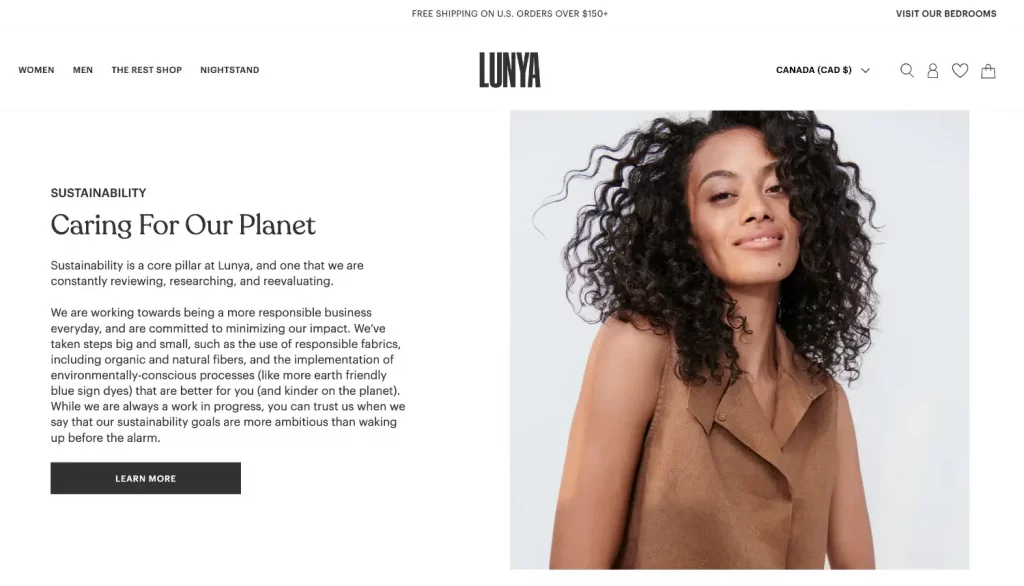
Support SEO and internal linking
Your About Us page Shopify can rank for branded search terms, founder names, and niche queries like “ethical skincare brand story” or “family-run coffee roaster.” It’s also a natural hub for internal links to your best-selling products, collections, and contact page — keeping bounce rates low and time-on-site high.
Differentiate from the competition
In crowded markets, product features and pricing often converge. Your story doesn’t. Two stores can sell the same candles; only one can sell your candles, made by a former firefighter in Portland using locally sourced soy wax. That story is a competitive moat that no competitor can copy.
What a Great Shopify About Us Page includes
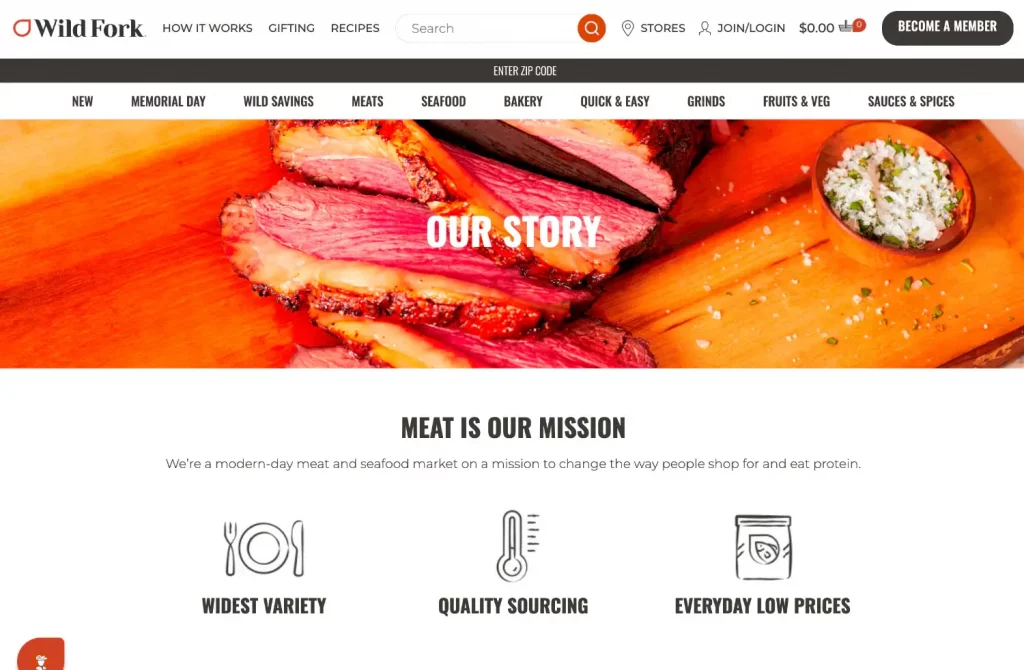
A compelling brand story
This is the core of your About Us page on Shopify. A great brand story follows a simple structure:
- Who you are — the founder, the team, or the community behind the brand
- Why you started — the problem you personally experienced that sparked the business
- What makes you different — your unique approach, values, or sourcing
- Who you serve — paint a picture of your ideal customer so they feel seen
Keep it human, specific, and honest. Avoid corporate buzzwords like “world-class solutions” or “passionate team.” Real stories with real details outperform polished marketing copy every time.
Real photos and authentic visuals
Stock photos on an About Us page send a subconscious signal: “We’re hiding something.” Use real photos of your team, your workshop, or your product being made.
Shopify supports full-width image sections and image-with-text blocks in most themes, making it easy to add visual storytelling to your About page without any coding.
Social proof and milestones
Numbers tell a story. Include trust signals like:
- Years in business (“Proudly serving customers since 2018”)
- Customer count (“Over 12,000 happy customers across 40 countries”)
- Press mentions or certifications (“Featured in Forbes, B Corp certified”)
- Awards or recognitions relevant to your niche
If you’re a newer brand without big numbers yet, use qualitative proof: testimonials, a handful of 5-star review quotes, or a powerful before/after story from a real customer.
A clear call-to-action (CTA)
One of the biggest mistakes on About Us pages in Shopify stores is ending with no direction. Your visitor just connected with your story — now what? Give them somewhere to go:
- Shop our bestsellers
- Read our blog
- Join our community
- Contact us
Never leave your About page as a dead end. A single, well-placed CTA button can meaningfully increase the conversion contribution of this page.
Mobile-friendly formatting
Over 70% of Shopify store traffic comes from mobile devices. Long paragraphs that look fine on a desktop become walls of text on a phone screen. Keep paragraphs to 2–3 sentences, use subheadings to break up sections, and ensure any images are compressed and responsive.
How to create Shopify About Us Page
Ready to build? Here’s the full walkthrough for creating your About Us page on Shopify:
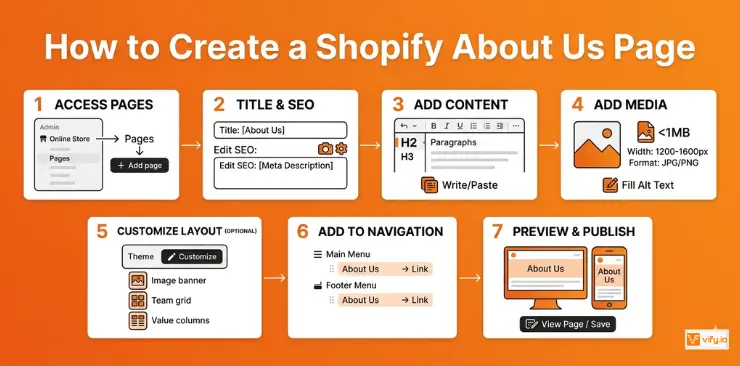
Step 1: Navigate to Pages in your Shopify admin
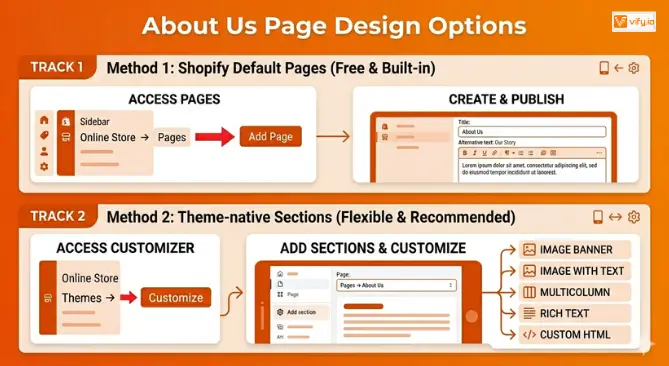
Log into your Shopify admin dashboard. In the left sidebar, go to Online Store → Pages. Click the “Add page” button in the top right corner.
Step 2: Set your page title and SEO settings
Set the page title to “About Us” or “Our Story”. Scroll to the bottom of the page editor and click “Edit website SEO.” Enter a unique page title (e.g. “About Us | [Your Brand Name]”) and a 150-character meta description that naturally includes your brand name.
Step 3: Write or paste your content
Use the rich text editor to paste your About Us content. Use the editor’s heading styles (H2, H3) to structure your content — this improves readability and helps Shopify’s built-in SEO. Break your story into short paragraphs.
Step 4: Add images and media
Click the image icon in the editor toolbar to upload photos. Recommended specs:
- File size: under 1MB per image for fast loading
- Width: 1200–1600px for full-width sections, 600–800px for inline images
- Format: JPG for photos, PNG for logos with transparent backgrounds
- Alt text: always fill this in — describe the image naturally
Step 5: Customize the layout in your theme editor (optional)
For a more visually compelling result, go to Online Store → Themes → Customize. In the top dropdown, select Pages → About Us. Here you can add and rearrange visual sections — image banners, team grids, value columns — without touching a line of code.
Step 6: Add the page to your navigation
A page no one can find helps no one. Go to Online Store → Navigation. Edit your Main Menu to add an About Us link, and also add it to your Footer Menu. Both placements are standard and expected by shoppers.
Step 7: Preview and publish
Click “View page” to preview on desktop. Then use the mobile preview icon in the theme editor to check how it looks on a phone. When you’re happy, hit “Save.” Your About page is now live.
Shopify About Us Page Template
Using a template saves time and gives you a proven structure to work from. Here are the best options for your About Us page template Shopify:
Shopify’s default About Us page (free, built-in)
Every Shopify store ships with a built-in Pages feature where you can create an About Us page using the rich text editor. It’s free, requires no apps, and works with every theme.
To access it: Shopify Admin → Online Store → Pages → Add Page. Set the title to “About Us” (or “Our Story” for a warmer feel), write your content, and publish.
Theme-native About Us sections
Most modern Shopify themes — including the free Dawn, Craft, and Sense themes — include pre-built sections specifically designed for About-style pages. These give you image-with-text layouts, multi-column grids, and video sections without any coding.
How to access them: Online Store → Themes → Customize → Pages → About Us. Use the “Add section” button on the left panel to insert blocks like:
- Image banner — for a full-width hero photo
- Image with text — for your founder story block
- Multicolumn — for your values or team members
- Rich text — for your main story content
- Custom HTML — for embedding video or advanced elements
This is the recommended approach for most Shopify About Us page builds. It’s free, fast, and produces a professional result.
Recommendation: Discover Top 12 Best Shopify Templates.
Page builder apps
If you want advanced drag-and-drop control over your About Us page template on Shopify, page builder apps give you the most flexibility:
- PageFly — Free plan available. Drag-and-drop editor with 100+ templates including About Us layouts. Best for beginners who want visual control.
- GemPages — Similar to PageFly with a strong template library. Free plan available. Ideal for brands wanting a highly designed, magazine-style About page.
- Shogun — Enterprise-grade page builder used by large Shopify brands. More powerful but pricier. Overkill for most small stores.
Conclusion
A great Shopify About Us page does far more than introduce your brand — it builds trust, creates emotional connection, and helps turn first-time visitors into loyal customers. By combining authentic storytelling, strong visuals, social proof, and clear calls-to-action, you can transform your About page from a forgotten footer link into a meaningful conversion asset. Whether you keep it simple with Shopify’s built-in page editor or create a fully customized layout with modern themes and page builders, investing time into your About Us page is one of the smartest long-term branding decisions you can make for your store.