
Over 4.6 million businesses worldwide have built their stores on Shopify, and millions of shoppers visit those stores every single day. Whether you stumbled across a Shopify-powered brand on Instagram or you’re a budding entrepreneur researching your options, Shopify online shopping is something worth understanding from both sides of the transaction.
What is Shopify online shopping?
At its core, Shopify is a software-as-a-service (SaaS) ecommerce platform that powers independent online stores. Unlike Amazon or eBay, Shopify is not a marketplace. There is no central Shopify storefront where all products live. Instead, each merchant builds and owns their own branded store, hosted on Shopify’s infrastructure.
Shopify online shopping refers to the act of buying or selling products through ecommerce stores built on the Shopify platform. Shopify is a hosted ecommerce solution that enables merchants to create fully functional online stores, while customers browse and purchase products through those stores using standard checkout flows, multiple payment options, and secure transactions.
Shopify handles everything a merchant needs to run an ecommerce business: product listings, inventory management, secure checkout, payment processing, shipping integrations, and marketing tools — all from a single dashboard. Merchants can customize their storefront using themes, add functionality via the Shopify App Store, and manage their business from desktop or mobile.
For buyers, the Shopify backend is largely invisible. What they see is a branded storefront: a clean product page, a simple cart, and a fast, secure checkout. What runs underneath is Shopify.
How online shopping on Shopify works (For Buyers)
If you have ever bought something from a brand’s website, there is a good chance you were already shopping on a Shopify store without knowing it.
Step 1: Finding a Shopify store
There is no single Shopify marketplace to browse. Instead, shoppers discover Shopify stores through:
- Google search: a brand’s Shopify store appears in organic results or Shopping ads
- Social media: Instagram, TikTok, and Facebook ads frequently link directly to Shopify storefronts
- Direct URL: branded domains like bestrunningshoes.com powered by Shopify
- Shop app: Shopify’s own consumer shopping app that aggregates stores
Step 2: Browsing products, adding to cart, and checking out
Online shopping on Shopify follows the same intuitive flow most online shoppers expect:
- Browse the storefront, filter by category, size, price, or collection
- Click a product to view images, descriptions, and variants (color, size, etc.)
- Add to cart and proceed to checkout
- Enter shipping details (or use Shop Pay autofill)
- Select shipping method and complete payment
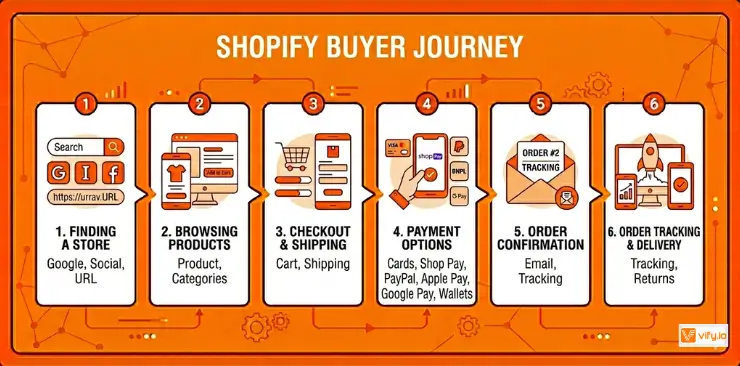
Step 3: Payment options
Shopify stores accept a wide range of payment methods, depending on how the merchant has configured their store. Most Shopify online stores accept:
- Credit and debit cards (Visa, Mastercard, Amex)
- Shop Pay — Shopify’s accelerated checkout that saves your info for one-tap purchases
- PayPal, Apple Pay, Google Pay
- Buy Now, Pay Later (BNPL) options such as Klarna, Afterpay, and Affirm
- Local payment methods (varies by country)
Step 4: Order tracking, shipping, and returns
After completing a purchase, buyers receive an order confirmation email with tracking details. Tracking can be managed through:
- The confirmation email from the merchant
- The Shop app (which aggregates all your Shopify orders in one place)
- The merchant’s website directly
Returns and refunds are handled by individual merchants, not Shopify centrally. Each store sets its own return policy, which is typically displayed in the store’s footer or checkout page. Shopify does provide merchants with built-in tools to process refunds and generate return labels.
How to start online shopping with Shopify (For Sellers)
Thinking about launching your own store? Online shopping with Shopify as a seller is one of the most accessible paths.
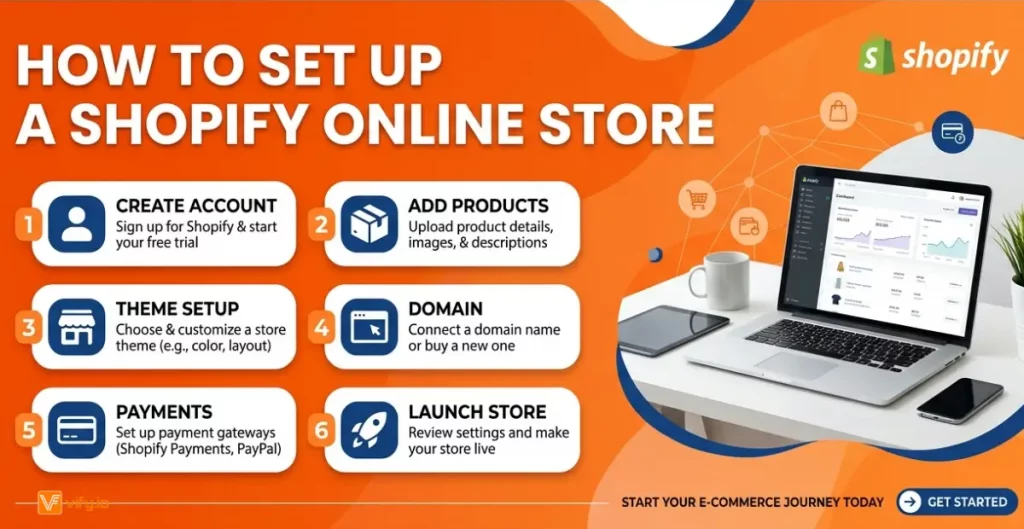
Step 1: Sign up and choose a plan
Start with a free trial. Shopify offers a 3-day free trial with no credit card required. After that, paid plans begin at $29/month (Basic). New users frequently receive extended trial offers — $1/month for the first 3 months is a recurring promotional deal.
Go to shopify.com, enter your email, and answer a few questions about your business. You will have a working store environment in under five minutes.
Step 2: Set up and optimize your online store
Once inside the Shopify admin, the core setup involves three things:
- Choose a theme. Shopify’s Theme Store offers free and paid themes (typically $100–$500 one-time). Themes control your store’s layout, fonts, and visual style.
- Add products. Upload product photos, write descriptions, set prices, and define variants (sizes, colors). Shopify supports physical products, digital downloads, and services.
- Connect a domain. Purchase a custom domain through Shopify or connect an existing one. A branded domain (yourbrand.com) builds trust with buyers.
Recommendation: Explore more on how to create an online Shopify store in minutes without any coding skills required.
Pros and Cons of online shopping Shopify
| Pros | Cons | |
| For Buyers | Secure, PCI-compliant checkout. Fast Shop Pay. Wide payment options. Reliable tracking via Shop app. | No central Shopify marketplace to browse. Return policies vary by merchant. No buyer protection program (unlike Amazon). |
| For Sellers | Easy setup, no coding required. Scales from startup to enterprise. Huge app ecosystem. Excellent uptime (99.99%). Built-in payments. | Monthly fees add up (plan + apps + themes). Transaction fees for third-party gateways. Less design flexibility than custom builds. Content limitations on a free blog. |
Conclusion
Shopify online shopping benefits everyone in the ecommerce ecosystem. Buyers get a fast, secure, and consistent checkout experience across thousands of independent brands, whether they are buying running shoes, artisan candles, or software tools. Sellers get a powerful, scalable platform that handles the technical complexity of running an online store, so that they can focus on products and customers.
If you’re selling on Shopify and need a professional invoice solution, then Vify Shopify Order Printer app is the best choice for you. Try it for free today and experience it for yourself. We’re confident you’ll love it.