
Your Shopify store might look stunning, but if your homepage title is still the default “My Store” — you are quietly handing free traffic to your competitors every single day. The Shopify homepage title is one of the most powerful yet most neglected on-page SEO elements available to store owners. It is the first thing Google reads when it crawls your site. It is what searchers see before they ever visit your store. And it directly influences whether someone clicks through — or scrolls past. Let’s discover how to write eye-catching Shopify homepage titles that boost conversions.
What is the Shopify Homepage Title?
The Shopify homepage title — also referred to as the title tag — is a short HTML element that defines the name of your homepage as it appears in three key places: Google search results, your browser tab, and social media previews when someone shares your URL.
It is important to understand that the homepage title is not the same as your H1 heading (the large visible heading on the page itself). Your H1 is what visitors read when they land on your site. Your title tag is what Google and other search engines read before anyone ever visits.
Think of your home page title on Shopify as a first impression with two audiences at once: the search engine and the potential customer.
Why Shopify Homepage Title matters
The title tag is one of Google’s most direct on-page ranking signals. When a user searches for a product category or brand name, Google scans your title tag first to determine whether your page is a relevant match. A well-optimised Shopify homepage title can move you from page two to the top of page one for your target keywords.
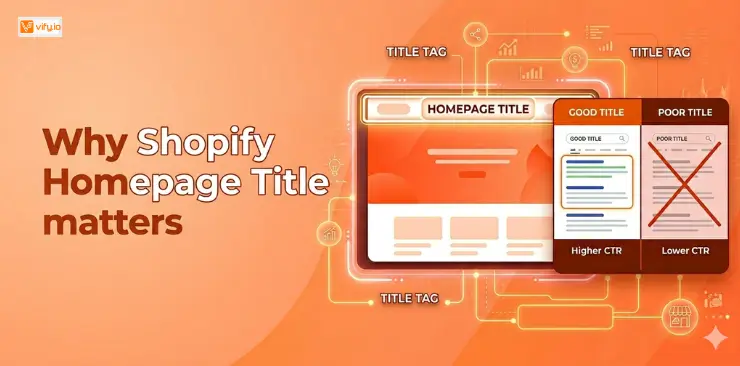
Beyond rankings, your title tag has a major impact on click-through rate (CTR). Research from Backlinko and other SEO studies consistently shows that pages with compelling, keyword-relevant titles attract more organic clicks — and higher CTR sends a positive signal back to Google, which can further boost your rankings over time.
Here is what is at stake with your homepage title Shopify setup:
- Organic ranking: Keyword placement in the title tag is a confirmed Google ranking factor.
- Click-through rate: A descriptive, benefit-driven title wins clicks over a generic one.
- Brand recognition: Consistent use of your brand name in the title builds awareness in SERPs.
- Social sharing: When someone shares your homepage link, the title tag becomes the preview headline.
How to change the Homepage Title in Shopify
Changing your Shopify homepage title takes less than two minutes. No coding required. Follow these steps:
- Log in to your Shopify Admin dashboard.
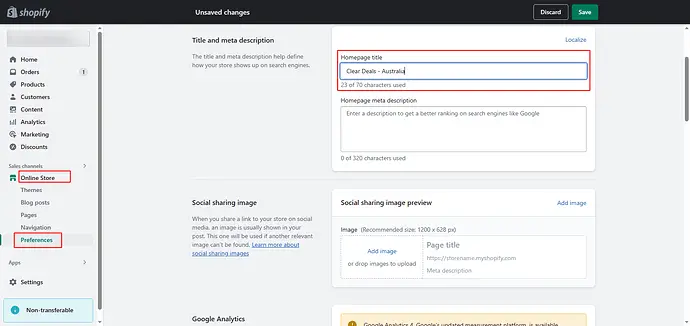
- In the left sidebar, click Online Store, then select Preferences.
- Scroll down to the section labelled Title and meta description.
- In the Homepage title field, type your new, optimised title.
- In the Homepage meta description field, write your meta description.
- Click Save to apply the changes.
That is all it takes to update your home page title on Shopify. Your changes will typically be reflected in Google Search Console within a few days to a few weeks, depending on how frequently Google crawls your domain.
How to write the perfect Shopify Homepage Title
Knowing where to enter your title is the easy part. Writing one that actually ranks and converts is where most store owners struggle. Here is a clear framework to follow.
The proven formula
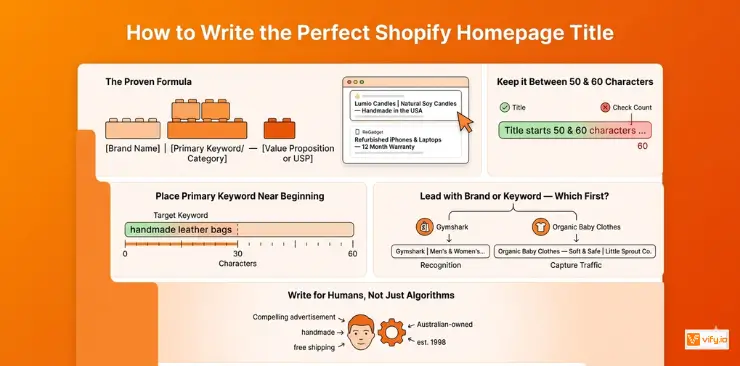
[Brand Name] | [Primary Keyword or Category] — [Value Proposition or USP]
Shopify homepage title examples:
- “Lumio Candles | Natural Soy Candles — Handmade in the USA”
- “ReGadget | Refurbished iPhones & Laptops — 12 Month Warranty”
This formula leads with your brand for recognition, includes a keyword for relevance, and ends with a compelling reason to click.
Keep it between 50 and 60 characters
Google typically displays the first 50 to 60 characters of a title tag in search results. Anything beyond that gets cut off with an ellipsis. Always remember to check your character count before publishing.
Place your primary keyword near the beginning
Google gives more weight to words that appear earlier in the title tag. If your target keyword is “organic skincare” or “handmade leather bags”, try to position it in the first half of your Shopify homepage title — ideally within the first 30 characters.
Lead with brand or keyword — which should come first?
This depends on your goals. If you are a well-known brand, leading with your name makes sense for recognition. If you are a smaller or newer store trying to capture category traffic, lead with the keyword. For example:
- Brand-first: “Gymshark | Men’s & Women’s Gym Wear”
- Keyword-first: “Organic Baby Clothes — Soft & Safe | Little Sprout Co.”
Common mistakes to avoid with Shopify Homepage Title
Even experienced store owners make these mistakes. Check your own title against this list before moving on.
- Leaving the default title: Shopify sets new stores to “My Store” or the store name only. This is never SEO-optimised and must be changed immediately.
- Going over 60 characters: Anything beyond this will be truncated in search results, which affects both professionalism and CTR. Keep a character counter open as you write.
- Duplicating your homepage title across other pages: Your homepage title should be unique. If it matches your About page or a collection page title, Google may struggle to distinguish which page to rank for a given query.
- Keyword stuffing: Titles like “Buy Cheap Shoes Shoes Online Best Shoes Australia” are flagged as spam. Google will rewrite your title if it detects stuffing — and the rewrite is rarely flattering.
Conclusion
Your Shopify homepage title is a small field that does a very big job. It tells Google what your store is about, convinces searchers to click on your listing, and sets the tone for how your brand appears across the web. The good news is that optimising it takes under five minutes — and the payoff can last for months or years in the form of higher rankings and more organic traffic.
Use the formula covered in this guide: lead with your brand or keyword, include a clear value proposition, stay under 60 characters, and write for both humans and search engines at the same time. Then review your homepage title Shopify setup quarterly to make sure it stays aligned with your store’s growth.