

Mobile shopping continues to shape how customers discover and buy products, making a dedicated Shopify mobile app an increasingly valuable tool for stores focused on convenience and customer retention. Beyond a mobile-friendly website, a branded app can provide faster access to products, personalized experiences, push notifications, and a smoother path for repeat purchases. This guide explains how a Shopify mobile app works, the benefits it can bring to your store, and what to consider when choosing the right solution.
What is a Shopify mobile app?
The term Shopify mobile app can refer to different things, so it is useful to make a clear distinction.
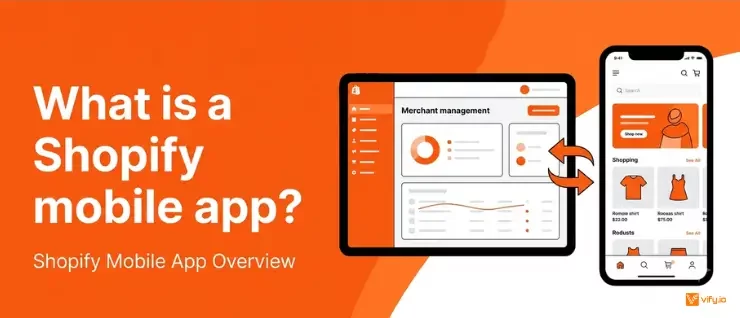
Shopify offers a mobile application that lets merchants manage their stores, review orders, update products, and monitor business activity. This app is designed for store owners and administrators.
A customer-facing mobile app is different. It is a branded shopping application connected to a Shopify store and designed for customers to browse and purchase products. A Shopify mobile app for customers usually pulls information directly from the existing store, including product details, pricing, inventory, customer accounts, and order data.
Instead of creating a completely separate ecommerce system, the app works as another customer-facing sales channel connected to the same Shopify backend. When products are updated in Shopify, those changes can also appear in the mobile app. Orders placed through the app are processed through the existing store, allowing merchants to manage operations in one central system.
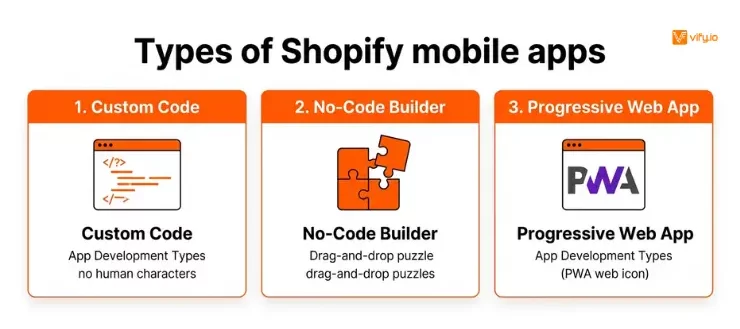
Depending on the solution, merchants may create a fully custom application, use a no-code app builder, or adopt another mobile commerce technology such as a progressive web app.
Why create a mobile app for your Shopify store?
A mobile website already lets customers shop on their phones, so the first question is usually simple: why add an app?
The main difference lies in the customer experience and the relationship a brand can build with frequent shoppers.
Create a more convenient shopping experience
A website usually requires customers to open a browser, search for the store or type in the URL, and wait for the page to load. A mobile app is available on the customer’s device and provides immediate access to the store.
This convenience may seem minor, but it can matter for brands with frequent or repeat purchases. Returning customers can open the app, browse new products, access saved information, and complete another purchase with fewer steps.
Apps can also be designed specifically for mobile interaction. Navigation, search, product discovery, and checkout can be optimized around smaller screens instead of adapting a desktop-first website layout.
Encourage repeat purchases
A dedicated app creates a more direct connection between a store and its existing customers. Once the application is installed, the brand remains visible on the customer’s device.
This can support retention in several ways. Saved customer accounts reduce friction during future purchases, wishlists make it easier to revisit products, and personalized recommendations can surface relevant items based on browsing or purchase history.
For businesses that rely heavily on repeat orders, these improvements can be more valuable than simply increasing first-time visitors.
Re-engage customers with push notifications
One of the most important advantages of many Shopify mobile apps is the ability to use push notifications.
Unlike email, push notifications appear directly on the customer’s device. However, the feature works best when used selectively. Sending too many promotional messages can encourage users to disable notifications or uninstall the app.
The goal should be to deliver useful and relevant information rather than turning every marketing campaign into a notification.
Build a stronger brand presence
A mobile app gives a business another branded touchpoint. The store icon, interface, product presentation, and notifications can all reinforce the business’s identity.
This is particularly useful for brands with an established customer base. An app can make the shopping experience feel more consistent and recognizable while giving customers a dedicated space to interact with the brand.
Support customer loyalty and retention
Customer acquisition is expensive, which makes retention increasingly important for ecommerce growth. A well-designed app can make it easier for existing customers to return, discover new products, and engage with loyalty programs.
A Shopify mobile app for customers can also bring several retention tools into one experience. Customers can track orders, earn points, save products, access exclusive offers, and receive personalized recommendations without switching between multiple channels.

Types of Shopify mobile apps
There are several approaches to building mobile experiences for a Shopify store. The right option depends on budget, technical resources, and the level of customization required.
Custom-built mobile apps
A custom application is designed specifically for a business.
This approach offers the greatest flexibility. The design, functionality, integrations, and customer experience can all be tailored to the brand’s requirements.
However, custom development usually requires a larger investment and ongoing technical maintenance. The business may need developers to manage updates, resolve compatibility issues, and release new versions as the operating systems and ecommerce platform evolve.
Custom development is generally better suited to established brands with specific requirements that cannot be addressed through existing app-building platforms.
No-code mobile app builders
No-code solutions allow merchants to create branded Shopify mobile apps without developing the entire application themselves.
These platforms usually provide pre-built components for product pages, navigation, search, customer accounts, notifications, and checkout. Merchants can customize the visual design and select the features they need.
This approach is often faster and more affordable than custom development. However, design flexibility and functionality may be limited by the platform’s available tools.
For many small and mid-sized businesses, a no-code solution provides a practical balance between cost, speed, and functionality.
Progressive web apps
A progressive web app, or PWA, provides an app-like experience through a web browser.
Customers do not necessarily need to install the application through an app store, which reduces the barrier to access. Depending on the implementation, a PWA may also support features such as offline access and home screen shortcuts.
However, PWAs do not always provide the same level of native functionality as applications published through Apple’s App Store or Google Play.
This option may suit businesses that want to improve their mobile experience without managing a traditional app store presence.
How does a Shopify mobile app work?
A customer-facing app generally uses Shopify as the central ecommerce system.
Product information, customer data, inventory, and orders continue to exist within Shopify. The mobile application acts as an additional interface that displays and uses this information.
The basic workflow usually looks like this:
- Product information is managed in Shopify.
- The app retrieves and displays relevant product data.
- Customers browse and add products to their cart.
- The checkout process connects with the store’s ecommerce infrastructure.
- Orders are recorded and managed through Shopify.
- Inventory is updated based on sales.
- Customers can access account and order information through the app.
This setup allows merchants to avoid managing separate product catalogs for their website and mobile application.
However, the exact synchronization capabilities depend on the solution. Before selecting a provider, it is important to understand how it handles inventory updates, product changes, discounts, customer accounts, and orders.

Choosing the right Shopify mobile app
The best solution is not necessarily the one with the longest feature list. The right choice depends on how the app fits into the broader business strategy.
Start with the purpose of the app
The first question is what problem the application is intended to solve.
A fashion brand with frequent product launches may prioritize visual merchandising and push notifications. A subscription business may focus on account management and recurring purchases. A store with a large catalog may need advanced search and personalized recommendations.
Defining the main goal makes it easier to eliminate unnecessary features and compare providers based on practical requirements.
Consider your catalog and store complexity
A small store with 30 products does not need the same technology as a retailer managing thousands of SKUs, multiple locations, and several sales channels.
Large catalogs may require better search, filtering, category management, and synchronization capabilities. Complex stores should also check whether the app supports product variants, bundles, subscriptions, loyalty programs, and other existing integrations.
Evaluate design flexibility
A mobile app should feel like an extension of the brand rather than a generic storefront with a different logo.
Review how much control the platform provides over layouts, navigation, colors, typography, and product presentation.
At the same time, excessive customization can increase setup and maintenance complexity. A balance between flexibility and simplicity is often more sustainable.
Check integration compatibility
The app should work with the tools already used by the store. Important integrations may include:
- Loyalty programs
- Subscription apps
- Product reviews
- Customer support tools
- Analytics platforms
- Email marketing software
- Personalization tools
Compatibility should be verified before committing to a long-term plan.
Look at scalability
A solution that works well for a small store may become restrictive as the business grows.
Consider pricing limits, monthly order caps, feature availability, and the provider’s ability to support larger catalogs and customer bases.

Conclusion
A Shopify mobile app can help merchants create a more convenient and personalized shopping experience while supporting customer loyalty and repeat purchases. The right solution depends on your store’s size, customer behavior, technical requirements, and long-term goals. By focusing on useful features, reliable Shopify synchronization, and a clear reason for customers to download the app, merchants can build a mobile experience that complements their website and creates stronger relationships with returning shoppers.
If you’re selling on Shopify and need a professional invoice solution, then Vify Shopify Order Printer app is the best choice for you. Try it for free today and experience it for yourself. We’re confident you’ll love it.