
As ecommerce competition continues to increase, a standard Shopify setup may not provide everything a growing business needs. Shopify web app development makes it possible to build custom functionality, improve store performance, and create experiences that better match specific business requirements. This guide explains what Shopify web app development involves, the main services available, and the typical development process for creating a high-performing Shopify solution.
What is Shopify web app development?
Shopify web app development involves creating custom web-based applications and storefront experiences that work with the Shopify ecosystem. These solutions can extend Shopify’s built-in capabilities and provide functionality designed around specific business needs.
Unlike basic theme customization, web app development can involve custom interfaces, application logic, APIs, third-party integrations, and advanced storefront functionality. Depending on the project, Shopify web apps development may focus on a customer-facing experience, an internal business tool, or a combination of both. Common areas include:
- Custom UI and UX
- Front-end development
- Shopify API integration
- Custom business logic
- Store performance
- Third-party integrations
- Headless storefront development
A Shopify web app can range from a focused custom tool to a more complex application that supports specific ecommerce workflows.

Core Shopify web app development services
A complete development project often combines several technical services to create a reliable and scalable solution.
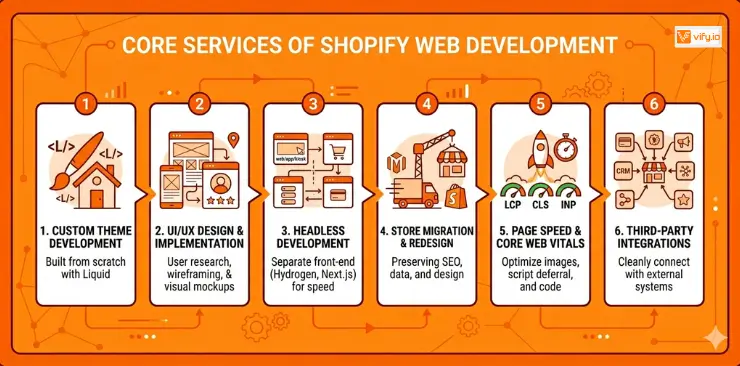
1. Custom web app development
Custom development is useful when Shopify’s standard features and existing apps cannot fully support a specific business workflow. Developers can create custom functionality based on the store’s requirements, including specialized customer experiences, internal tools, and automated processes.
This approach provides greater control over how the application works and how it connects with the existing Shopify setup.
2. UI/UX Design & Implementation
A successful web application needs a clear and intuitive interface. The design process typically includes wireframes, prototypes, and visual concepts that define how users interact with the application.
Once the design is approved, developers turn these concepts into a functional interface that works consistently across desktop and mobile devices.
3. Headless Shopify development
Headless commerce provides another approach to Shopify web app development. Shopify continues to handle core ecommerce functions such as products, inventory, checkout, and payments, while the customer-facing experience is built separately.
Technologies such as Shopify Hydrogen, Next.js, and Nuxt.js can create custom storefronts with greater control over the interface and performance. This architecture offers more flexibility but also requires additional development and maintenance resources.

4. Shopify store migration and redesign
Businesses may need custom development when moving to Shopify from platforms such as WooCommerce or Magento, or when rebuilding an existing Shopify store.
A successful migration involves transferring important content and data, maintaining SEO value, setting up redirects, and updating the storefront without creating unnecessary disruption to the business.
5. Performance optimization
Store and application performance have a direct impact on user experience and conversion rates. Shopify web app development services may include performance improvements that target Core Web Vitals such as Largest Contentful Paint (LCP), Cumulative Layout Shift (CLS), and Interaction to Next Paint (INP).
Common optimization work includes image compression, code refinement, lazy loading, and reducing unnecessary scripts that can slow down the storefront.
6. Third-Party Integrations
Many Shopify businesses rely on external platforms for payments, customer management, inventory, marketing, accounting, and other operations.
Shopify web app development services can connect these systems with Shopify through APIs and other integration methods. A well-designed integration helps data move efficiently between platforms while keeping the customer experience consistent.
The Shopify web app development process
A structured development process helps keep the project aligned with business goals and technical requirements. While each project has its own scope, most web app development Shopify projects follow several key stages.
Step 1: Discovery and Planning
The project starts with a discovery phase that defines the business goals, target users, required functionality, technical requirements, and expected outcomes.
The development team also reviews the existing Shopify setup, identifies integration requirements, and determines the most suitable technical approach.
Step 2: Wireframing and Application Structure
Once the requirements are clear, wireframes are created to define the application’s structure and user flow. This stage focuses on navigation, content hierarchy, and core interactions before detailed visual design begins.
Early feedback at this stage helps reduce major design changes later in the project.
Step 3: Visual Design
Designers then create detailed mockups that define the application’s visual appearance. This includes typography, colors, layouts, buttons, forms, and other interface components.
The final design provides developers with a clear reference for the implementation stage.
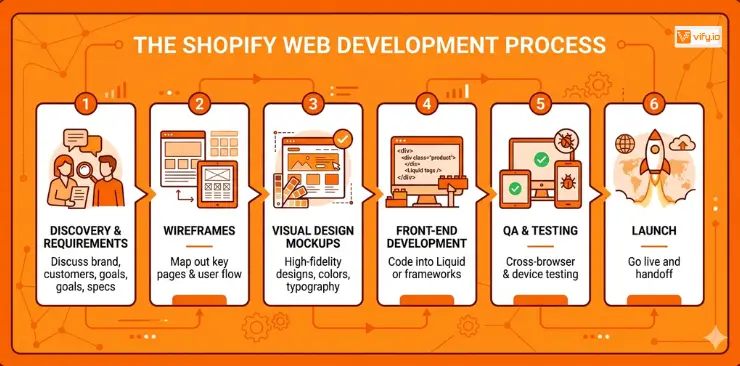
Step 4: Development
Developers transform the approved designs into a functional web application. Depending on the project, development may use Shopify APIs, Liquid, JavaScript frameworks, Hydrogen, Next.js, or other technologies.
The goal is to create a responsive and reliable application that works smoothly within the Shopify ecosystem.
Step 5: Testing and Quality Assurance
Before launch, the application goes through comprehensive testing. This may include functionality testing, mobile responsiveness checks, browser compatibility testing, performance reviews, accessibility checks, and integration validation.
Testing helps identify technical issues before customers interact with the finished application.
Step 6: Launch and Ongoing Support
After testing is complete, the application is deployed to the live environment. Final configuration checks are performed, and the development team monitors the application after launch.
Ongoing support may include bug fixes, performance improvements, security updates, and additional functionality as business requirements evolve.
How to choose Shopify web app development services
The right development partner depends on the complexity of the project and the technical requirements involved. Before selecting a provider, consider their Shopify experience, development capabilities, integration expertise, communication process, and post-launch support.
It is also important to define the project scope clearly. A simple custom feature may require a different approach than a full web application, headless storefront, or complex integration system. Clear requirements make it easier to estimate development time, budget, and technical resources.

Conclusion
Shopify web app development provides a flexible way to extend Shopify beyond its standard features and create custom experiences around specific business needs. A well-planned solution can improve functionality, performance, integrations, and the overall customer experience. Choosing the right Shopify web app development technologies and working with an experienced development team can also create a stronger foundation for future growth.
If you’re selling on Shopify and need a professional invoice solution, then Vify Shopify Order Printer app is the best choice for you. Try it for free today and experience it for yourself. We’re confident you’ll love it.