
Shopify WhatsApp Integration helps Shopify merchants connect with customers through a familiar and convenient messaging channel. It makes customer communication faster and more accessible, while supporting product inquiries, order updates, and personalized assistance. This guide explains how the integration works, how to set it up, and how WhatsApp can help improve customer service for your Shopify store.
What is Shopify WhatsApp integration?
Shopify WhatsApp integration is the connection between your Shopify store and WhatsApp that lets you communicate with customers, send automated notifications, and in some cases sell products, all inside the WhatsApp app rather than email or SMS. Depending on the method you choose, WhatsApp integration with Shopify can mean anything from a simple floating chat button that opens a pre-filled WhatsApp message to a fully automated system that sends abandoned cart reminders, order confirmations, shipping updates, and COD (cash-on-delivery) verification messages without any manual work.
The important distinction to understand before choosing a method: WhatsApp itself does not offer a native Shopify integration inside the Shopify admin. Every WhatsApp Shopify integration on the market today is built either on top of the free WhatsApp Business app (manual, limited to one device) or on the official WhatsApp Business API (automated, built for scale). Shopify App Store apps are essentially interfaces that make the Business API usable without code.

Why integrate WhatsApp with your Shopify store
Email open rates for ecommerce hover in the 15–25% range, and SMS is capped by character limits and rising carrier costs. WhatsApp messages are read differently: customers already check WhatsApp multiple times a day for personal conversations, so a shipping update or cart reminder lands in a context they’re already paying attention to. For merchants running high-COD markets (India, Southeast Asia, Latin America), WhatsApp integration Shopify setups are also used to confirm orders before dispatch, which measurably cuts return-to-origin (RTO) rates.
The most common reasons merchants add WhatsApp integration to Shopify stores are:
- Recovering abandoned checkouts with a message customers actually open
- Cutting support response time by moving from email tickets to real-time chat
- Confirming COD orders to reduce failed deliveries and returns
- Sending order and shipping status updates without relying on SMS credits
- Letting customers browse and buy from a product catalog without leaving WhatsApp

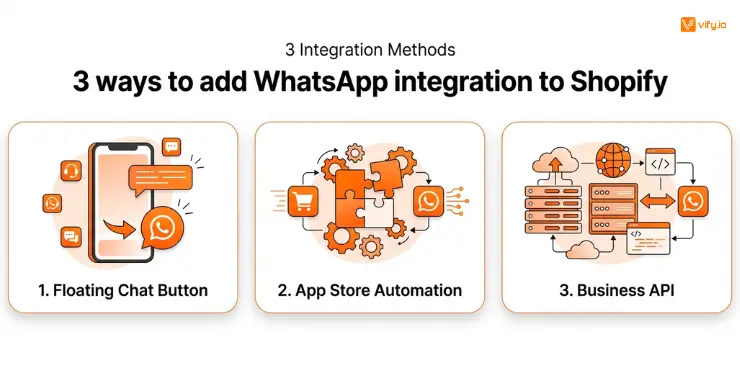
3 ways to add WhatsApp integration to Shopify
There isn’t a single official method; merchants generally choose among three tiers, depending on their budget and how much automation they need.
1. Free WhatsApp chat button (Manual link method)
The simplest option is a floating WhatsApp button added to your storefront’s theme code or via a free app, which opens a pre-filled WhatsApp chat when clicked. This uses the free consumer WhatsApp Business app, not the API, so every message still has to be answered manually from your phone. There’s no abandoned cart automation, no order notifications, and no catalog sync. This is a reasonable starting point for very small stores, but it does not scale past a handful of daily conversations.
2. Shopify App Store apps (No-code automation)
This is what most merchants mean when they search for WhatsApp integration with Shopify. Apps like Interakt, Zoko, Ctx, WATI, and AiSensy connect to the official WhatsApp Business API behind the scenes and give you a no-code dashboard to build automated flows: abandoned cart recovery, order confirmations, broadcast campaigns, and a shared team inbox for support. These apps sync order and customer data directly from Shopify, so messages can be personalized (customer name, product image, order status) without manual entry. Pricing is typically a monthly subscription plus a small per-message fee for the underlying WhatsApp API, since Meta charges for API-sent conversations independently of the app you use.
3. Official WhatsApp Business API (Enterprise/High-Volume)
Larger merchants sending thousands of messages a month sometimes go directly to a WhatsApp Business Solution Provider (BSP) and build a custom integration through Shopify’s Admin API and webhooks, rather than using an off-the-shelf app. This route offers the most control — custom message templates, multi-number routing, and direct CRM integrations — but requires development resources most small and mid-sized stores don’t have. For the vast majority of merchants, a Shopify App Store app sitting on top of the same official API delivers the same core functionality with far less setup time.
Which method should you choose?
Before comparing individual apps, it helps to match the method to your store’s actual stage. A brand-new store with a handful of daily conversations doesn’t need the same setup as a store processing hundreds of COD orders a day — and installing a heavier tool than you need just adds cost and a steeper learning curve without a proportional return.
| Method | Setup Difficulty | Automation Level | Best For |
| Free chat button | Very easy (minutes) | None — fully manual | Very small stores, pre-launch validation |
| Shopify App Store app | Easy to moderate (under an hour) | High — cart, orders, broadcasts | Most growing DTC and COD stores |
| Custom Business API build | Complex (developer required) | Fully custom | High-volume, multi-brand, or enterprise operations |
For the large majority of merchants searching for WhatsApp Shopify integration, the middle row is the right answer: a Shopify App Store app gives you API-level automation without needing a developer on staff, and every app covered below falls into that category.
How to measure ROI after integration
Once WhatsApp integration Shopify automation is live, treat it like any other marketing and support channel and track it against a baseline, rather than assuming it’s working because messages are being sent.
- Cart recovery rate: compare the percentage of abandoned checkouts recovered via WhatsApp against your prior email-only recovery rate.
- Message read and response time: most apps show open rates in the dashboard. WhatsApp typically outperforms email significantly here, so a rate close to email’s is a sign of a deliverability problem.
- RTO/return rate on COD orders: if you added WhatsApp order verification, track whether failed and returned COD deliveries drop over the following weeks.
- Support resolution time: compare average first-response time on WhatsApp against your existing email or live chat channel.
- Cost per recovered order: divide your monthly app + API spend by the number of orders directly attributable to WhatsApp messages, so you can compare it against email or SMS recovery costs.

Conclusion
Shopify WhatsApp integration offers a practical way to improve customer communication while adding automation to everyday store operations. For most growing Shopify stores, a Shopify App Store solution provides a good balance between setup time, automation, and cost. The right choice ultimately depends on the store’s order volume, customer communication needs, and the level of automation required.
If you’re selling on Shopify and need a professional invoice solution, then Vify Shopify Order Printer app is the best choice for you. Try it for free today and experience it for yourself. We’re confident you’ll love it.