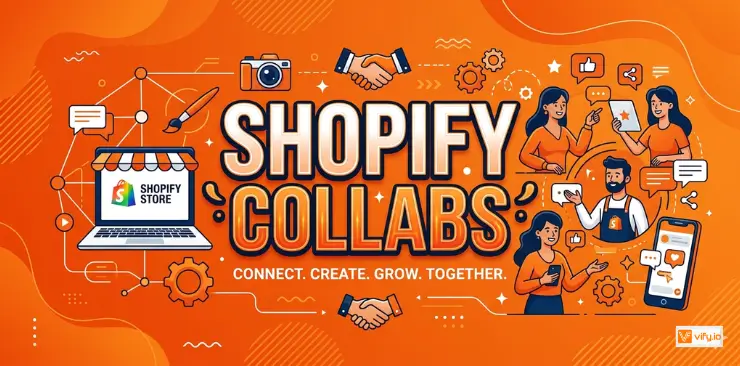
If you’ve spent any time scrolling through Instagram, TikTok, or YouTube lately, you’ve probably noticed something: almost every product you see is being recommended by someone, not just advertised by a brand. A creator unboxes it, tries it on, reviews it — and suddenly thousands of people want to buy it too. This is the world of creative marketing. And now, thanks to Shopify Collabs , even small and medium-sized Shopify stores can tap into this same kind of marketing without spending money upfront.
What is Shopify Collabs?
Shopify Collabs is a built-in tool of Shopify that helps merchants connect with content creators, influencers, and affiliates willing to promote their products.
Think of it as a matchmaking service between two groups of people:
- Merchants who have products to sell and want more people to discover them.
- Creators (influencers, bloggers, TikTokers, YouTubers, niche content makers) who are looking for brands to collaborate with — often in exchange for free products, a commission on sales, or both.
What makes Shopify Collabs different from other influencer marketing tools is that it’s built directly into Shopify itself. You don’t need to install a separate app, create a new account on another website, or manually export sales data into a spreadsheet. Everything is already connected, because Collabs lives right inside the same dashboard you already use every day.
How does Shopify Collab work?
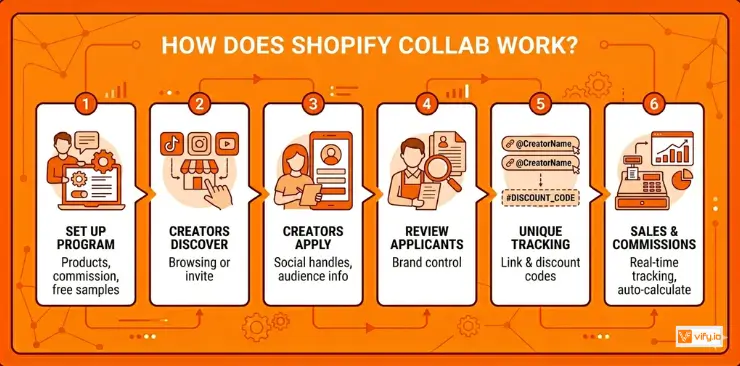
Now that you know what Shopify Collabs is, let’s explore how it actually works in practice. The process is designed to feel simple.
1. You (the merchant) set up a Collabs program. This means deciding things like: which products creators can promote, how much commission you’re willing to pay per sale, and whether you want to send free products to creators as samples. b
2. Creators discover your program. This can happen in two ways. Either creators browse the Shopify Collabs marketplace and find your brand on their own, or you can directly invite specific creators you already follow, for example, someone whose content style matches your brand’s vibe.
3. Creators apply to join your program. Just like a job application, creators submit some basic information about themselves: their social media handles, audience size, content style, etc.
4. You review and approve (or decline) applicants. This step is important because it gives you control over who represents your brand.
5. Approved creators get their own unique affiliate link and/or discount code. This is the “tracking” part of the system. Whenever someone clicks that link or uses that code to make a purchase, Shopify knows exactly which creator gets credit for the sale.
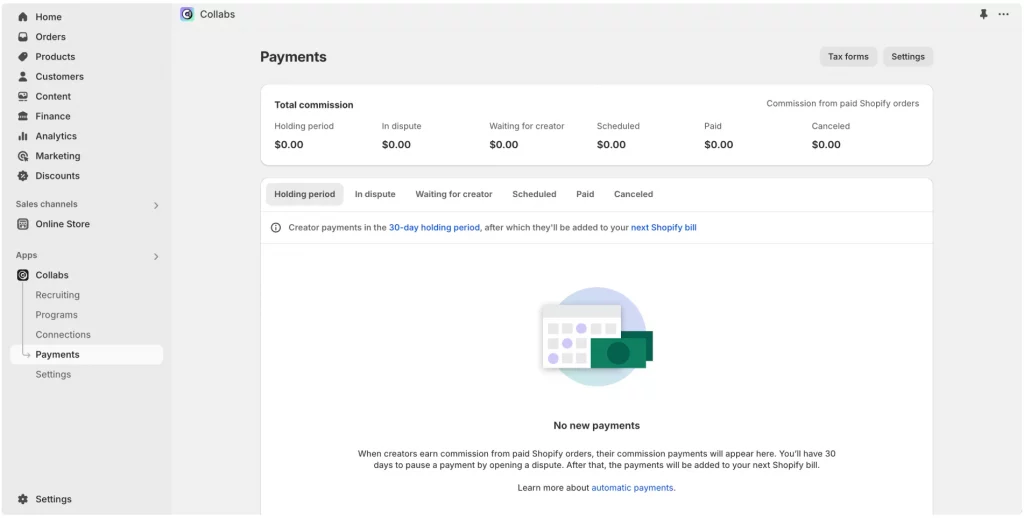
6. Sales happen, and commissions are calculated automatically. No more manually checking who sold what or cross-referencing spreadsheets. The system tracks everything in real time.
7. Payouts are processed. Instead of you having to send money to each creator individually, Shopify Collabs handles the payment process through its existing infrastructure.
Key features of Shopify Collabs
Let’s discover the specific features that make Shopify Collabs useful. Understanding these will help you get a clearer picture of what you can actually do with the tool.
Creator Discovery and Marketplace
One of the biggest challenges with influencer marketing has always been simply finding the right people to work with. Shopify Collabs addresses this with a built-in marketplace where creators actively look for brands to partner with, and where merchants can browse creator profiles, see their content style, and get a sense of whether they’d be a good fit.
This is especially helpful for beginners because it removes the “cold outreach” problem. Instead of sending dozens of DMs to influencers who might never respond, you can publish your program and let interested creators come to you.
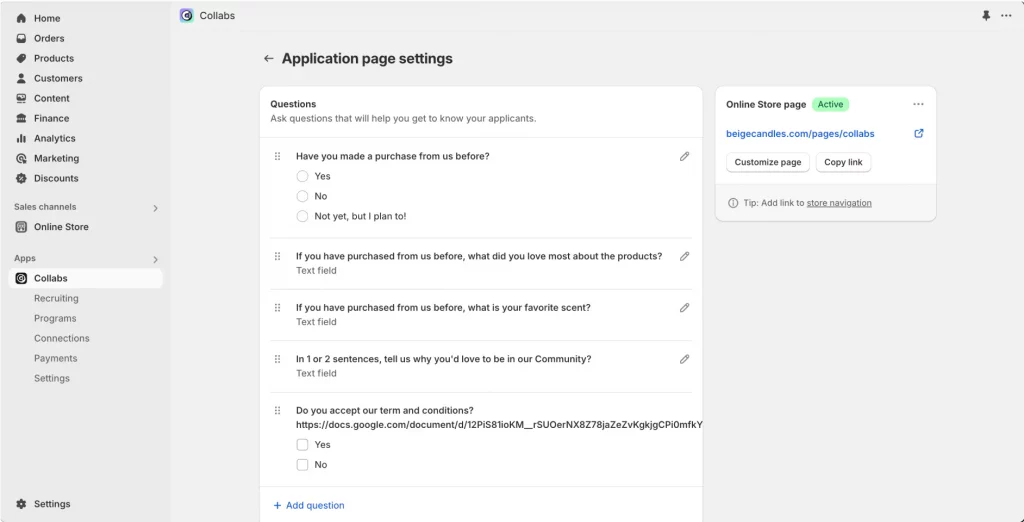
Custom Application Forms for Creators
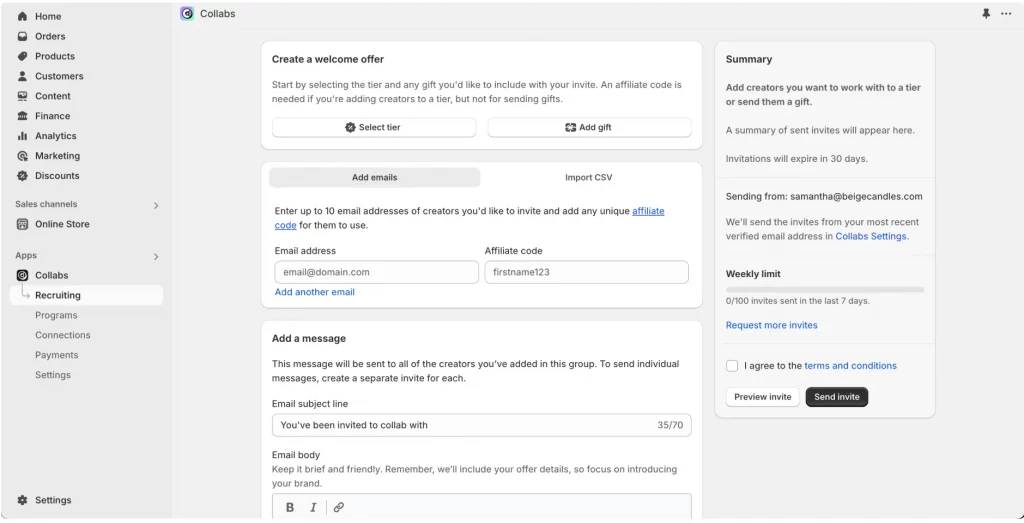
When someone wants to join your program, you don’t have to accept them blindly. You can build a custom application form that asks for the information that matters most to your brand.
- Which social media platforms are they active on
- Their follower count or general audience size
- The type of content they typically create
- Why they’re interested in your products specifically
This step acts as a filter, helping you avoid partnering with creators whose audience or content style doesn’t really match what you’re selling. For example, a skincare brand probably wants creators who already post about beauty and self-care, rather than someone whose content is mostly about cars or gaming.
Free Product Seeding/Gifting
Instead of creators cashing up front, you can send them your products for free. In exchange, they create content about it: an unboxing video, a try-on haul, a review, or just a casual mention woven into their everyday content.
This approach works particularly well for newer brands that don’t have a large marketing budget yet. The “cost” is essentially the product itself (plus shipping), rather than a cash payment. The content created often ends up feeling more authentic, because it comes across less like a paid advertisement and more like a genuine recommendation from someone the audience already trusts.
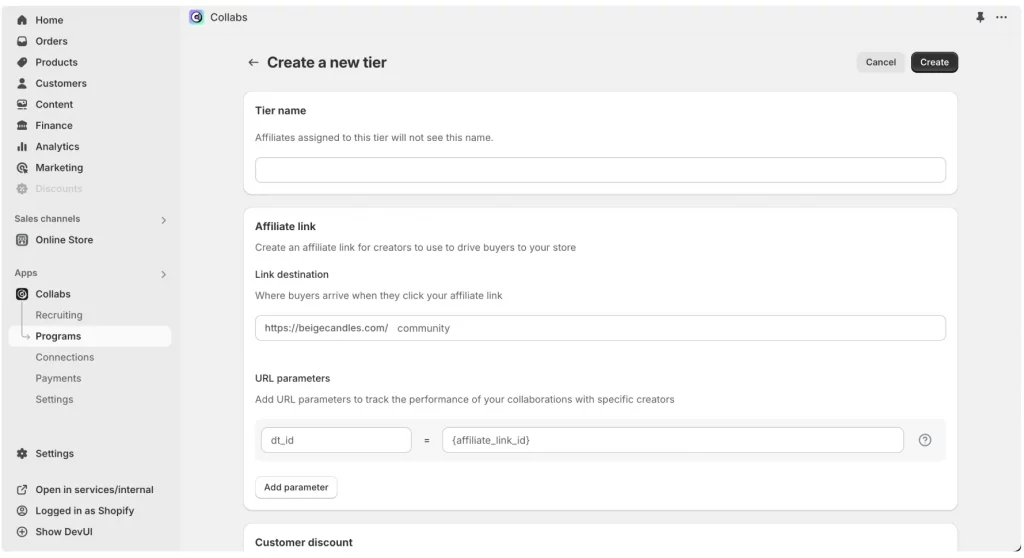
Affiliate Link and Discount Code Generation
Every creator approved into your program gets their own unique tracking tools — typically an affiliate link, a discount code, or both.
- Affiliate links let creators share a special URL that, when clicked, tells Shopify “this visitor came from this specific creator”.
- Discount codes give the creator’s audience a reason to buy, while also letting Shopify track that the resulting sale came through that creator.
Many brands use both together: the discount code gives the audience an incentive to act now, while the link helps with tracking.
Commission Tracking and Automated Payouts
In the past, tracking affiliate sales often meant manually checking spreadsheets, cross-referencing discount codes with order data, and calculating who owed what to whom. With Shopify Collabs, all of this happens automatically. The system tracks every sale tied to a creator’s link or code, calculates the commission based on the rate you’ve set, and prepares it for payout.
Performance Analytics Dashboard
The analytics dashboard gives you visibility into which creators are driving traffic, how many of those visits turn into sales, and how much revenue each creator is generating for your store.
This data is incredibly useful because it helps you identify your “star” creators — the ones who are genuinely moving the needle — so you can focus more attention, better commission rates, or exclusive offers on the partnerships that matter most.
How to set up Shopify Collabs
Step 1: Install and Enable Collabs
Shopify Collabs is typically accessible as a built-in app or channel within your admin dashboard. Once it’s enabled, it automatically connects to your existing product catalog and order history, so there’s no need to import or sync anything manually.
Step 2: Create Creator Application Page
You can explain what your brand is about, what kind of creators you’re looking for, and what they can expect in return, whether that’s commission rates, free products, or both. Think of it as a mini landing page designed to attract the right kind of applicants and set clear expectations from the start.
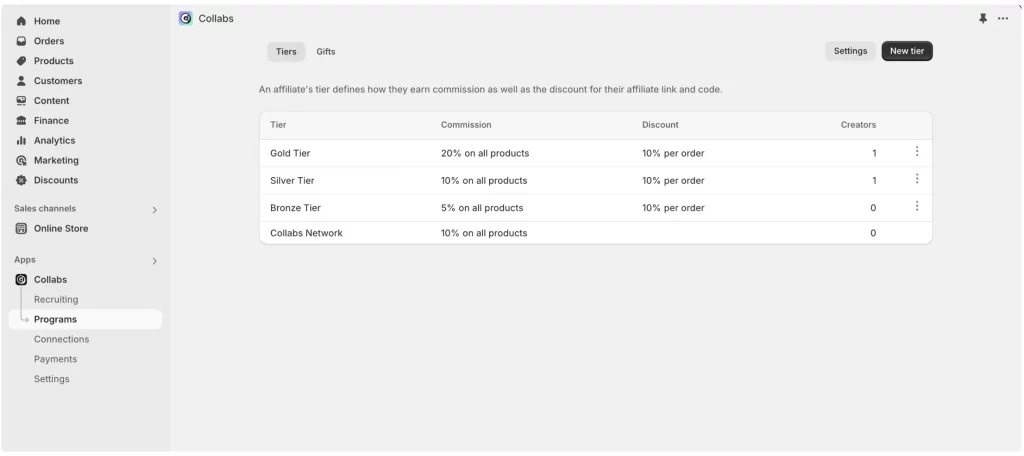
Step 3: Set Commission Rates and Terms
This is one of the most important decisions, so it’s worth taking some time here. Some things to think about:
- What percentage commission can you realistically afford while still making a healthy profit on each sale?
- Will you offer the same rate to everyone, or different rates depending on a creator’s performance over time?
- Will you also offer free products, in addition to (or sometimes instead of) commission payments?
Step 4: Approve and Onboard Creators
Once your program is live and applications start coming in, take the time to review them rather than automatically approving everyone. Look at the creator’s content style, their general audience size, and whether their followers seem like the type of people who’d genuinely be interested in your products. Once you approve someone, they’ll get instant access to their affiliate tools — links, codes, and any product gifting options you’ve set up for the program.
Benefits of Shopify Collabs
Cost-effective influencer marketing. Traditional influencer marketing often involves paying creators a flat fee upfront with no guarantee of results. With Shopify Collabs, the commission-based model means you’re primarily paying for actual sales, which dramatically reduces your financial risk compared to upfront payments.
Increased brand awareness through user-generated content (UGC). Every piece of content a creator makes is essentially free marketing material that shows real people using your product in real life. This kind of content often performs better than traditional ads because it feels more authentic and relatable to the audience.
Performance-based payment model. Because commissions are tied directly to sales, your marketing spend naturally scales with your actual results. If a particular creator isn’t driving sales, you’re not losing significant money on that partnership. If a creator is driving lots of sales, both of you benefit — they earn more, and you’re generating revenue that more than covers the cost.
Building long-term creative relationships. Rather than treating influencer marketing as a series of one-off transactions, Shopify Collabs makes it easy to maintain ongoing relationships with creators. A creator who performs well today can gradually become a long-term brand ambassador, who tends to produce more consistent, authentic content over time, and often has a stronger sense of genuine enthusiasm for your products.
Conclusion
Shopify Collabs removes most of the traditional barriers to creative marketing. Merchants do not need a big budget, a separate platform, or a marketing agency to get started. By connecting with creators who genuinely fit your brand, offering fair compensation, and using the built-in tracking and analytics tools, even a small Shopify store can start building meaningful creator partnerships.
If you’re selling on Shopify and need a professional invoice solution, then Vify Shopify Order Printer app is the best choice for you. Try it for free today and experience it for yourself. We’re confident you’ll love it.