Creating and downloading invoices on Shopify doesn’t have to feel technical or time-consuming. If you’ve ever struggled with generating clean, professional invoices or figuring out where to download them, you’re not alone. The good news is that with the right tool, the entire process becomes quick, intuitive, and even enjoyable. In this guide, you’ll learn exactly how to get PDF invoices on Shopify step by step, explore real invoice templates, and understand why the Vify PDF Invoice app is a go-to choice for many merchants.
1. Why people want to get invoice from Shopify?
People often think invoices are just a “nice-to-have,” but for many Shopify merchants, they’re actually essential to running a smooth and professional business.
First, invoices build trust and credibility. When customers receive a clear, well-structured invoice, it reassures them that your store is legitimate and reliable—especially for higher-value orders or B2B transactions.
Second, they’re important for accounting and tax purposes. Many customers (and almost all business buyers) need invoices to track expenses, file taxes, or get reimbursements. Without one, it can create friction or even prevent a purchase.
Invoices also help merchants stay organized. They provide a clear record of every transaction, making it easier to manage bookkeeping, audits, and financial reporting.
Another big reason is legal and regional requirements. In many countries, providing invoices isn’t optional—it’s required. Having a proper system ensures compliance and avoids potential issues down the line.
Finally, invoices enhance the post-purchase experience. Sending them automatically saves time, reduces support requests (“Can I get my invoice?”), and makes your store feel more professional overall.
In short, invoices aren’t just paperwork—they’re a key part of trust, operations, and growth for any serious Shopify business.
2. Step to download invoices
By default, Shopify doesn’t provide a built-in feature to easily generate and download PDF invoices. That’s where the Vify PDF Invoice app comes in. It’s designed to simplify the process and make invoice management seamless—even if you have zero technical experience.
To get started, install the Vify PDF Invoice app from the Shopify App Store. One of the biggest advantages is that it offers a free plan, allowing you to create and download invoices without any upfront cost.
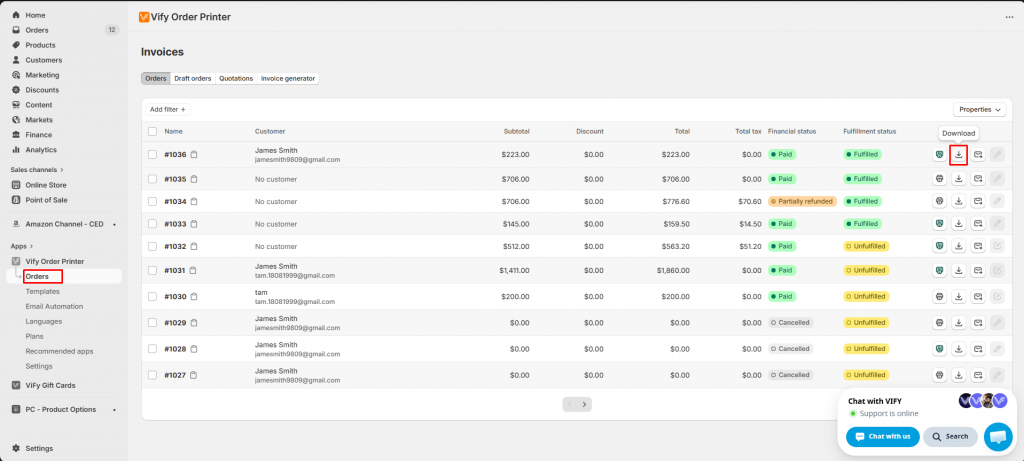
Here’s how you can download an invoice in just a few simple steps:
-
First, open Vify PDF Invoice app
-
Navigate to the Orders section.
-
Select the order for which you want to generate an invoice.
-
Once Vify is installed, you’ll see a Download button available directly within the order view.
-
Click the button, and your invoice will be instantly downloaded in PDF format.
That’s it. No complicated setup, no coding, and no manual formatting required. The process is designed to save time while ensuring every invoice looks professional.
3. Some examples of Shopify invoices
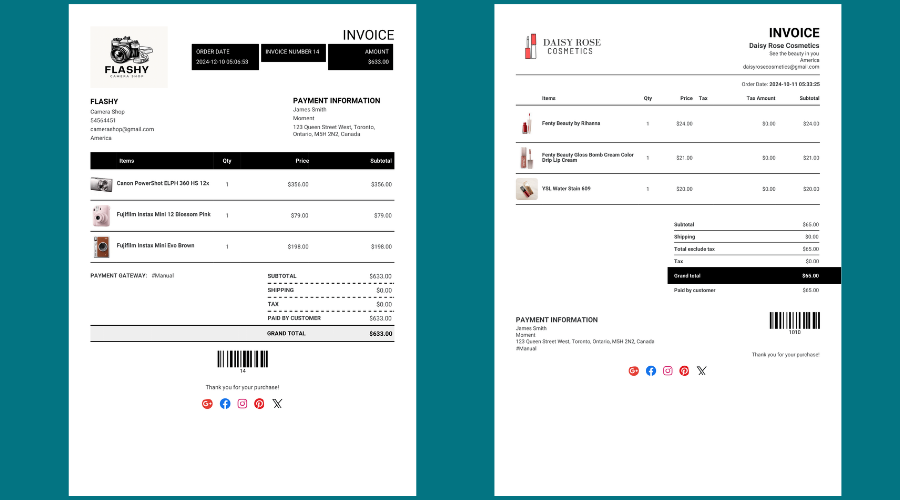
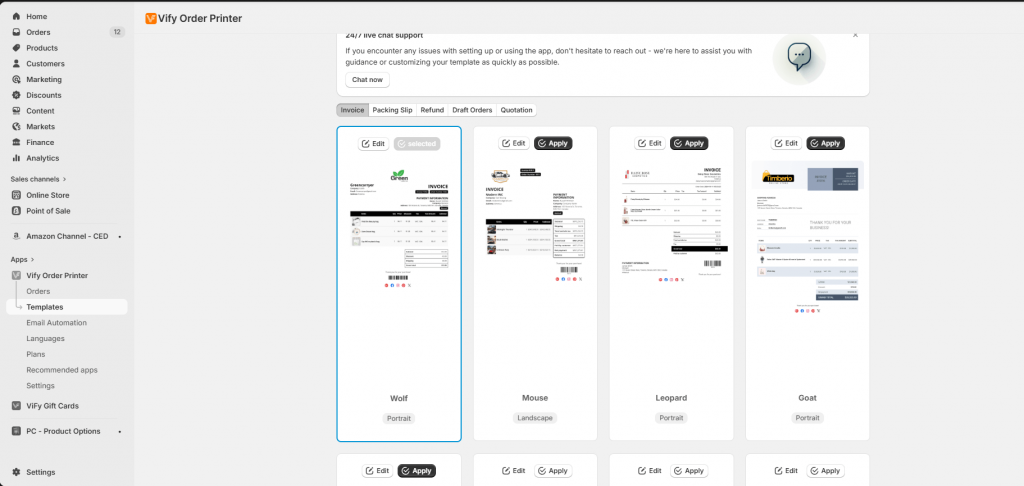
If you’re wondering what your invoices will actually look like, Vify offers a strong variety of templates to choose from. The app includes 11 ready-to-use invoice designs that cater to different business styles and branding needs.
These templates are thoughtfully designed to be:
-
Clean and easy to read
-
Professionally structured
-
Customizable to match your brand identity
You can easily adjust elements such as your logo, business information, colors, and layout. Whether you prefer a minimal and modern look or something more detailed and traditional, there’s a template that fits.
For example, some invoice templates focus on simplicity with clear sections for billing details and order summaries, while others include more branding elements like headers, accent colors, and highlighted totals. This flexibility allows you to create invoices that not only serve a functional purpose but also reinforce your brand image.
Having access to multiple templates also means you can experiment and find what works best for your customers. A well-designed invoice can leave a stronger impression than you might expect.
4. Why is Vify considered one of the best PDF invoice apps on Shopify?
When choosing a PDF invoice solution for Shopify, merchants are usually looking for more than just a basic tool—they want something reliable, flexible, and easy to use in their day-to-day operations. This is where Vify stands out, not only for its features but for how seamlessly it fits into a merchant’s workflow.
Here’s why many Shopify merchants prefer Vify:
-
Free plan available
Vify offers a free plan, making it easy for new or growing Shopify stores to start generating invoices without upfront costs. This lowers the barrier to entry and allows merchants to test the app before committing to a paid option. -
No coding required
The app is built for non-technical users, with an intuitive interface that doesn’t require any coding knowledge. Merchants can set up and manage invoices بسهولة without relying on developers or external support. -
Professional templates
Vify provides 11 ready-made invoice templates designed to look clean and professional. These templates ensure that invoices include all necessary details while maintaining a polished appearance that builds trust with customers. -
Easy customization
Merchants can customize invoices to match their brand by adding logos, editing fields, and adjusting layouts. This flexibility helps create a consistent brand experience and ensures invoices meet specific business needs. -
Fast and convenient workflow
Invoices can be generated and downloaded directly from the Shopify admin in just a few clicks. This saves time, reduces manual work, and minimizes errors compared to creating invoices manually or using multiple tools. -
Simplified overall process
Instead of dealing with complex systems or time-consuming manual tasks, Vify streamlines the entire invoicing workflow. It provides a straightforward solution that helps merchants stay organized and efficient.
Instead of spending time manually creating invoices or dealing with complicated tools, Vify gives you a straightforward solution that just works.
Conclusion
Managing invoices shouldn’t slow down your business. With the Vify PDF Invoice app, you can easily generate, customize, and download professional PDF invoices directly from Shopify. The combination of a free plan, ready-to-use templates, and a simple workflow makes it an ideal choice for merchants who want efficiency without sacrificing quality.
If your goal is to create clean, branded invoices with minimal effort, Vify is definitely worth trying. It turns what used to be a tedious task into something fast, smooth, and reliable – exactly how it should be.
This article has shared how to easily and efficiently get PDF invoices on Shopify. We hope these insights provide you with a clear overview and help you confidently choose the best PDF invoice app for your Shopify store.