

Recurring revenue has become one of the most effective ways for ecommerce businesses to build predictable growth and strengthen customer retention. By using Shopify recurring payments, merchants can automate repeat billing, simplify the customer experience, and create a more stable revenue stream. In this guide, we’ll explore how Shopify recurring payments work, how to set them up, and the best ways to use them to support long-term ecommerce success.
What are recurring payments on Shopify?
Shopify recurring payments are automated charges that occur on a defined schedule (weekly, monthly, quarterly, annually, or at any custom interval) without the customer needing to manually re-purchase or re-enter their payment details. The customer consents to the recurring charge at the time of their first purchase, their payment method is securely stored, and subsequent charges occur automatically on the agreed schedule.
From the merchant’s perspective, recurring payments create Monthly Recurring Revenue (MRR) — the predictable, compounding revenue base that distinguishes subscription businesses from transaction-based ones. From the customer’s perspective, subscriptions offer convenience, often a discount, and the assurance of never running out of a product they use regularly.
Why recurring payments with Shopify matter
Adding recurring payments to your Shopify store offers benefits that go far beyond convenience. For many ecommerce businesses, it creates a more stable and scalable revenue model while strengthening long-term customer relationships.
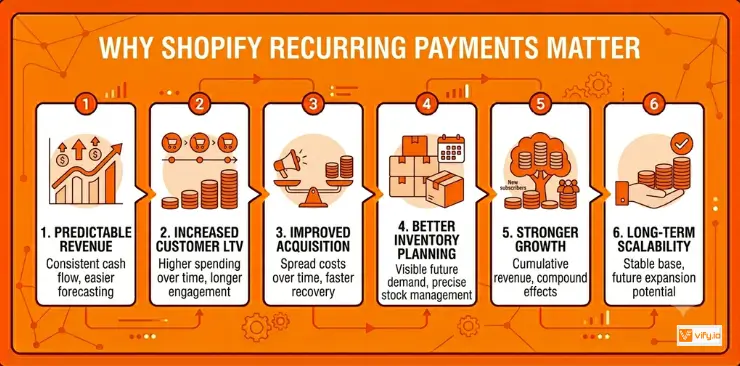
More predictable revenue. Recurring payments generate consistent monthly income, making it easier to forecast cash flow and plan ahead. With greater visibility into future revenue, businesses can make more confident decisions about inventory, hiring, marketing budgets, and expansion initiatives.
Increased customer lifetime value (LTV). Subscribers typically remain engaged with a brand longer than one-time buyers. Because they make purchases on a recurring basis, their overall spending tends to be significantly higher over the course of the customer relationship.
Improved acquisition efficiency. The cost of acquiring a customer becomes much more manageable when that customer continues purchasing over multiple billing cycles. Instead of relying on a single transaction to recover acquisition costs, businesses can spread that investment across months of recurring revenue.
Better inventory planning. Subscription orders provide greater visibility into future demand. Knowing approximately how many recurring orders to expect helps merchants manage stock levels more effectively, reducing the likelihood of both excess inventory and stock shortages.
Stronger long-term growth potential. Each new subscriber contributes to an existing recurring revenue base. As subscription customers continue renewing while new ones join, revenue growth becomes cumulative rather than dependent solely on acquiring new customers every month.
The market opportunity is also difficult to ignore. Shopify research shows that 78% of consumers prefer subscription options for products they purchase regularly. Businesses that introduce recurring payment models early are often better positioned to increase retention, generate more predictable revenue, and build a lasting competitive advantage.
How to set up recurring payments on Shopify
Most subscription apps built on Shopify’s native Subscriptions API follow a similar setup process. While menus and settings may vary slightly between apps such as Appstle, Seal Subscriptions, Recurpay, or Recharge, the overall workflow remains largely the same.
Step 1: Select the right subscription model
Before installing an app, start by deciding how recurring purchases will fit into your business model. The structure you choose should align with both your products and customer buying habits.
A Subscribe & Save model is often ideal for products customers purchase regularly, such as supplements, coffee, skincare, or pet supplies. Subscription boxes work well for curated product experiences, while membership programs are commonly used for exclusive communities, premium content, or loyalty benefits. Brands that emphasize customization may benefit from a Build-a-Box approach, allowing customers to personalize each recurring order.
Taking the time to define your subscription strategy early can prevent unnecessary adjustments and configuration changes later.
Step 2: Install a subscription app
Once you’ve selected a subscription model, install a compatible subscription app from the Shopify App Store.
Most apps require access to customer, order, and billing data to manage recurring transactions effectively. After installation, connect the app to your active payment gateway and configure the core subscription settings, including available billing frequencies, subscriber discounts, and customer notification preferences.
This stage establishes the foundation for how recurring payments will operate across your store.
Step 3: Create subscription plans
Next, determine which products customers can subscribe to and configure the available subscription options.
For example, a recurring product might allow customers to receive deliveries every two weeks, every month, or every two months. You can also offer different discount levels based on the selected billing interval and let customers choose between a one-time purchase and a subscription on the same product page.
The subscription selector should be displayed prominently within the product page layout so customers can easily understand and choose their preferred option.
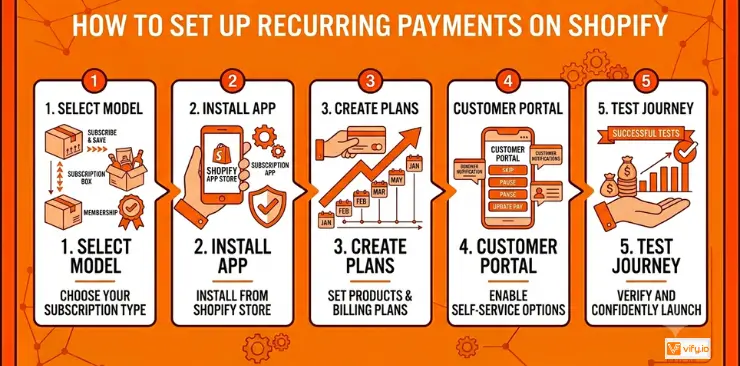
Step 4: Configure the customer subscription portal
A well-designed customer portal plays a major role in reducing cancellations and minimizing support requests.
Subscribers should be able to manage their own accounts without contacting your support team. Essential self-service options typically include skipping upcoming orders, pausing subscriptions, changing delivery frequency, swapping products, updating shipping details, and modifying payment information.
Most subscription apps automatically generate a customer portal and include access links within order confirmation emails. Customizing the portal to match your store’s branding helps create a more consistent customer experience.
Step 5: Test the entire subscription journey
Before launching recurring payments to customers, conduct thorough testing across the entire subscription workflow.
Place a test subscription order, review confirmation emails, verify customer portal access, and ensure subscriptions appear correctly within both Shopify and your subscription app dashboard. If your app provides a testing environment, run a sample billing cycle to confirm that recurring charges, order creation, and customer notifications function as expected.
You should also test common customer actions such as pausing, skipping, updating payment methods, and canceling subscriptions. Identifying issues before launch helps prevent customer frustration later.
Reduce failed recurring payments Shopify
Failed payments are one of the biggest challenges for subscription-based businesses. Expired cards, insufficient funds, and bank declines can all interrupt recurring billing and lead to avoidable customer churn. Fortunately, many failed payments can be recovered through a proactive retention strategy.
Build an effective dunning process
A dunning process refers to the automated sequence of payment retries and customer communications triggered after a recurring payment fails.
Rather than canceling a subscription immediately, businesses should give customers multiple opportunities to resolve the issue. A typical recovery workflow might begin with an automatic retry within 24 hours, followed by reminder emails if the payment continues to fail. Additional retry attempts can be scheduled several days apart, with increasingly urgent notifications encouraging customers to update their payment information.
If all payment attempts remain unsuccessful, suspending the subscription is often a better approach than permanently canceling it. This preserves the customer relationship and creates future opportunities for reactivation.

Encourage customers to update expiring cards early
One of the most common causes of failed recurring payments is an expired credit or debit card. Sending automated reminders before stored payment methods expire gives subscribers time to update their details before the next billing date arrives.
While Shopify Payments can automatically update some card information through participating banks, coverage is not universal. Proactive reminders help close that gap and reduce avoidable payment interruptions.
Use grace periods for better customer retention
For subscription products that customers rely on regularly, such as consumables or monthly subscription boxes, consider implementing a short grace period. Instead of immediately blocking fulfillment after a failed charge, continue processing the order while additional payment attempts are made in the background.
This approach reduces the likelihood of customers missing deliveries because of a temporary payment issue, such as a bank outage or short-term card restriction. Maintaining service continuity can significantly improve customer satisfaction and reduce voluntary subscription cancellations following a failed payment attempt.
Conclusion
Recurring revenue has become a key growth driver for modern ecommerce businesses, and Shopify recurring payments make it easier to build that revenue on a consistent basis. As subscription commerce continues to grow, investing in a well-structured recurring payments strategy can help strengthen customer relationships, improve business stability, and support long-term ecommerce success.
If you’re selling on Shopify and need a professional invoice solution, then Vify Shopify Order Printer app is the best choice for you. Try it for free today and experience it for yourself. We’re confident you’ll love it.